Every enterprise struggles with the ‘multiple versions of truth’ problem. The anecdote where two people show up to an executive meeting with 2 different numbers for the same metric is a real problem. These meetings can get tense where semantics are argued instead of recommendations and actions. As someone responsible for data and analytics, I’ve felt the pain of these moments, especially when the source of confusion and solutions to resolve are simple. These are points where trust the information delivery pipeline (applications, data, analytics, information) are put in to question.
Enterprises with mature data and analytics practices still have these problems. Simple issues like mismatched timestamps, unclear filters, or inconsistent metric names can cause time wasting misunderstandings. Sometimes the root cause is competing reports or poorly aligned definitions. Other times, it’s just a lack of shared understanding.
This article explores the role of semantics in enterprise reporting and offers practical solutions to eliminate conflicting truths, starting with the simplest fixes while highlighting some of the lessons AI integrators can learn for the shortcomings of Business Intelligence.

Some multiple versions of truth problems are caused by semantics disconnect
Solving enterprise semantics problems with a data-first mindset is incredibly difficult. It’s like trying to solve a Rubik’s cube where the colors change constantly. There are plenty of smart folks out there taking a fresh look at this problem. I refer to this bottom up (data first) perspective where the objective function is connect data to meaning. This meaning helps describe how to manipulate data into a business consumable format that is to connect and theoretically reusable across analytical problems. I remain skeptical that building new data semantics layers without without process and functions for governance is creating the same problem in a new place; hoping for a different result.
Technology-centered perspective: For a long time, data and analytics platforms vendors have taken a self-centered view of the semantic layer. As a result, semantics are scattered and disjoined across self service reporting business applications, and now data platforms. There common variables across semantic layers are very thin and provide enough meaning for analysts and analytics professionals to create. The actual semantics and understanding of the semantic layer sadly is tribal knowledge or fragmented documentation. Universal semantic layers like At-Scale that could have the right solution at the right time.
My history and perspective:
Years ago, my time working at BusinessObjects taught me a lot about what works and doesn’t work with universal semantic layers. I have never had so much fun working in enterprise data and analytics during those days. I watched intense focus and high emphasis on governance and process to create a single source of truth. What happened? Service tools like Tableau, Qlik, and Power BI took off and what we consider today modern data platforms (cloud data warehouse) matured. These tools been transformational for me as a practitioner to get done in days what took months as I create re-usable models and blueprints.
Why Semantics Matter
Business semantics is the general corporate language or business vernacular used day to day. Ignoring all of the structures and technical jargon…. Terms like ‘customer,’ ‘revenue,’ and ‘activated’ are three common examples where meaning in a single organization can vary based purely on who, where, and what you are discussing. Semantics can be organized into a variety of structures for capturing meta data like semantic layers, taxonomies, glossaries and or embedded into more advanced frameworks like graphs and ontologies. You can walk into two different companies that compete in the same industry segment and experience different semantics.
Data/ analytics semantics aka “semantic layers” include the technical definitions, relationships, and rules that translate raw data into metrics, dimensions, and facts. This structured layer often defines how data is joined, filtered, aggregated, and labeled. This makes it possible for consistent reporting across BI tools and business functions. As the business intelligence function became decentralized and organizations purchased multiple tools, some enterprises struggle with multiple versions of truth purely as a function of disconnect between business semantics and semantic layers. A semantic layer that is not maintained and governed can produce incorrect results.
6 Simple Causes (That Have Nothing to Do with Your Semantic Layer)
The presence of semantic layers, even when executed flawlessly, will not always solve the multiple versions of truth problem. If you have 1 system of record, 1 semantic layer, 1 report… You can still end up with multiple versions of truth! Here are the common real-world instances that occur regularly with ultra simple solutions!
#1 Differing date/time dimensions: Example: Cohorts vs Activities.
Someone pulls a cohort-based metric into a report. A second person pulls the same metric from a historical trend for that metric. Both report the same period of time but the numbers are different! Both parties are correct, but reporting semantically different versions of what happened.
Solution: Improve the title and apply a detailed description and disclaimer in reports.
In data geek speak… A single metric can exist in one semantic layer, but when reported, it can be sliced by different time dimensions, which alters its semantic meaning. The problem and solution is proper explanation of semantic meaning when this information is delivered. You could have two metrics expressed in your semantic layer.
#2 Same numbers pulled at different point in time.
Same report pulled at different point in time. In this case both parties are correct.
Solution: Add an “as of” date clearly to every report or dashboard. I’m still surprised how often this simple step is skipped. I am guilty of it myself…
#3 Two flavors of same metric (from same self service report)
Someone views a metric through a different filter or lens, leading to two versions of the same number — without any context explaining how the data was filtered.
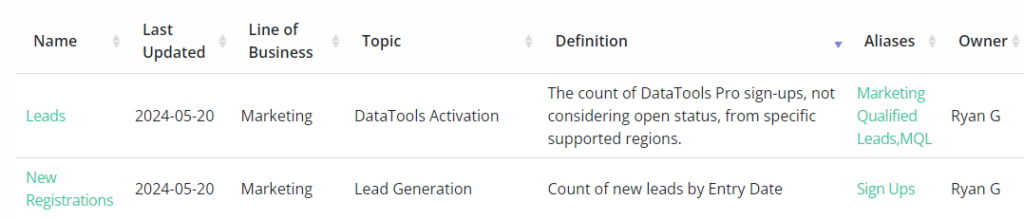
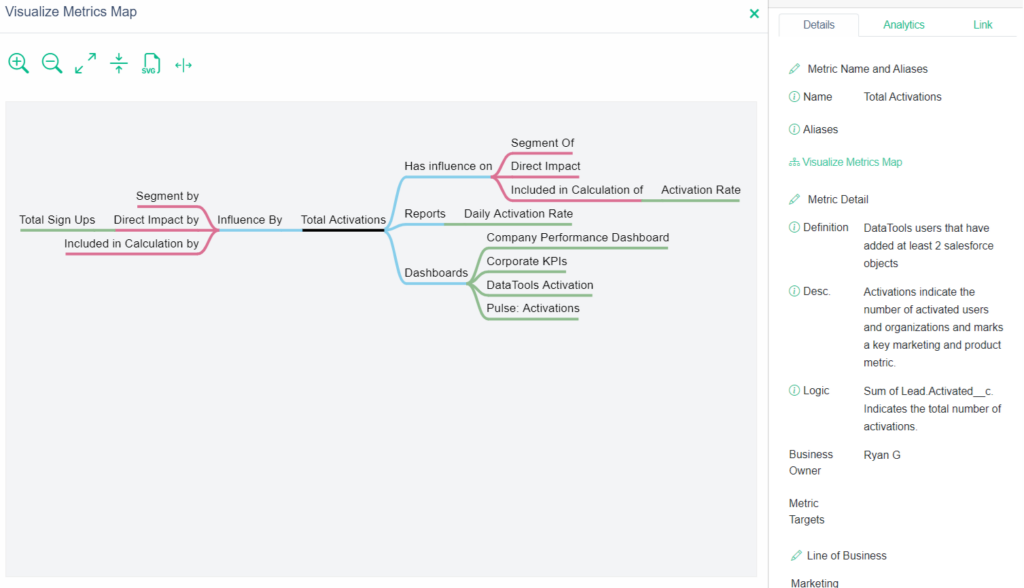
Solution: This is a scenario where data semantics maters and business semantics need to converge. In my approach with our metrics glossary we include context data that surrounds the use of a metric.
#4 Aliases and naming conventions
PowerPoint slide includes a key metric, but the name used on the slide doesn’t match the name used in the report. This disconnect can create unnecessary confusion or debate.
Solution: Sometimes it’s a case where the same metric has multiple names.. Other times, it’s just an error that wasn’t caught.
#5 Change management
Changes in the application, data, or analytics pipeline can introduce inconsistencies. When these changes are systemic or ongoing, you need to dig deeper to identify the root cause:
- Limited team capacity or lack of training
- Missing or ineffective governance processes
- Gaps in software development lifecycle (SDLC) practices
- Accumulated technical debt or platform bloat
Solution: Every customer has its own issues delivering consistent and reliable decision support. The root cases here in my experience is all over the board.
#6 Excel exports and manipulation
Data gets exported to Excel, where it’s often modified, transformed, or manually blended. It’s then presented alongside official reports, leading to inconsistencies that are difficult to trace.
Solution: Alignment and evaluating Excel logic is typically required to get to a solution.
These issues are a small sample of use cases I have captured to create process and tools to help address them. So what if the root of your problems and prescribed solution is creating a new semantic layer…?
Solve Multiple Versions of Truth with Semantics Layer Alignment
1: PEOPLE: Creating a semantic layer is the starting line and not the finish line
Teams need to find a way to close the gap between information consumers and the semantic layer creators. Rarely does a business consumer’s understanding of metrics start from the creation of a semantic layer. Newly created semantics and metrics that shed new light on the business process require even more alignment and care.
2. PROCESS: Semantic layer management done right is a governance process and NOT a technology requirement gathering process
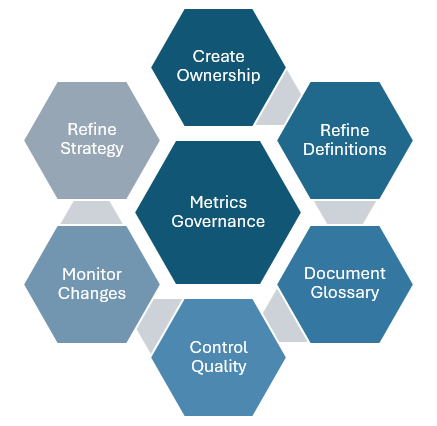
Create a recurring governance process to align on the organization’s most important semantics, specifically metrics, KPIs, facts, and dimensions. Effective governance is not about tools or data for that matter.. It’s about structured conversations, shared understanding, and formalized communication pathways, and accountability.
3. TECH: Capturing when, how, why and where changes happen that distorts facts?
Use metadata tools, or catalogue tools with audit capabilities. Audit usage, monitor schema drift, and understand where facts get distorted. Technology alone won’t solve your problems, but it can shine a light on root causes.
4. AI: The hype is justified, but the reality is messy
Semantics of all types will remain a hot topic tech and service companies compete to become your go-to AI/ BI solution. The idea of having an in-house AI analyst, available 24×7 to answer business questions with data, is compelling. And to be fair, there’s a lot of real innovation happening in this space
I approach this constantly wanting to work my way out of a job. But based on my own testing, I’d describe today’s AI analysts as something that is technically capable, but operating as if it’s their seventh day on the job; and they’ve got a touch of amnesia.
That’s not a critique from the sidelines. I’ve loaded these models with structured data semantics, business context, report and dashboard metadata, usage logs, and conversational history. The confident insights and stats are magical. If feels less magical when you already know the correct answers.
So what happens when a business stakeholder walks into a meeting, proudly armed with insights from their new AI assistant, only to discover the output is way off? AI gets thrown under the bus.

How do you set yourself on the right path to create a useful and correct semantic layer with current technology solutions?
If you are a data or analytics professional getting started and wanting to implement a semantic layer and want to maximize adoption, I recommend the following advice:
- Get out of the database and sit in on meetings where metrics are presented and debated.
- Conduct a metrics governance alignment meetings between business stakeholders.
- Put emphasis on standardizing and organizing curated reports for executive facing meetings.
- Create internal naming conventions, tooltips, and glossary tags for reuse.
Have more advice or experiences that you want to share? Let me know!
More info on how I am solving semantics problems at DataTools Pro
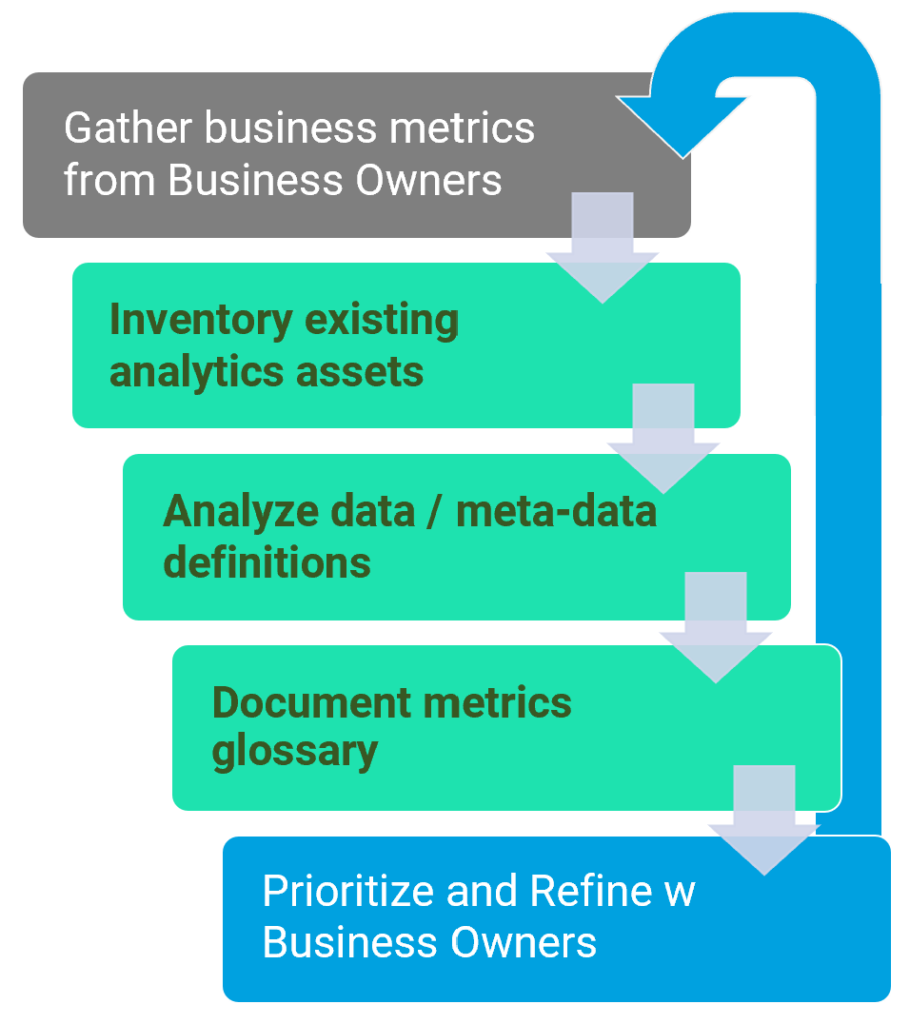
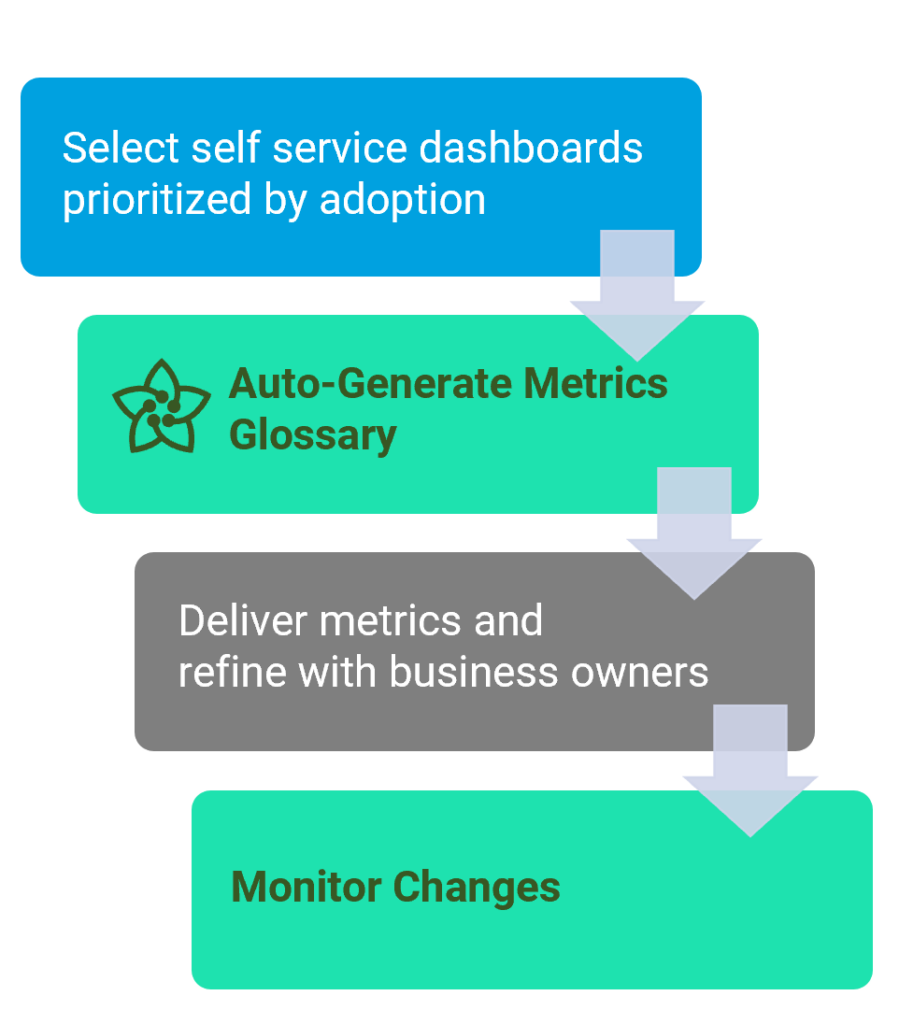
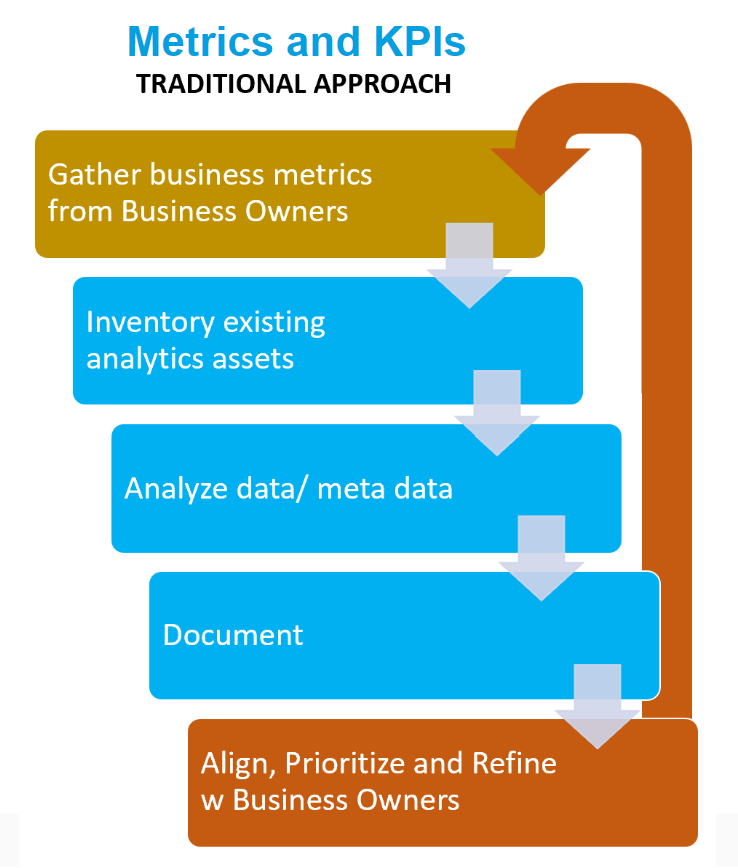
In 2023, I set out to automate discovery, alignment, and change tracking for metrics and KPIs. The goal was simple: speed up onboarding and improve trust in metrics definitions. What we built, and continue to refine, is a metrics-first approach to semantic alignment. We released metrics analyst in early 2024 and have continued to refine in our vision. Shaped by customer feedback, failure, and iteration, we are releasing version 2 this summer!
I’m excited to solve at least one side of the Rubik’s Cube… even if the colors keep changing. Feel free to schedule a call to learn more!