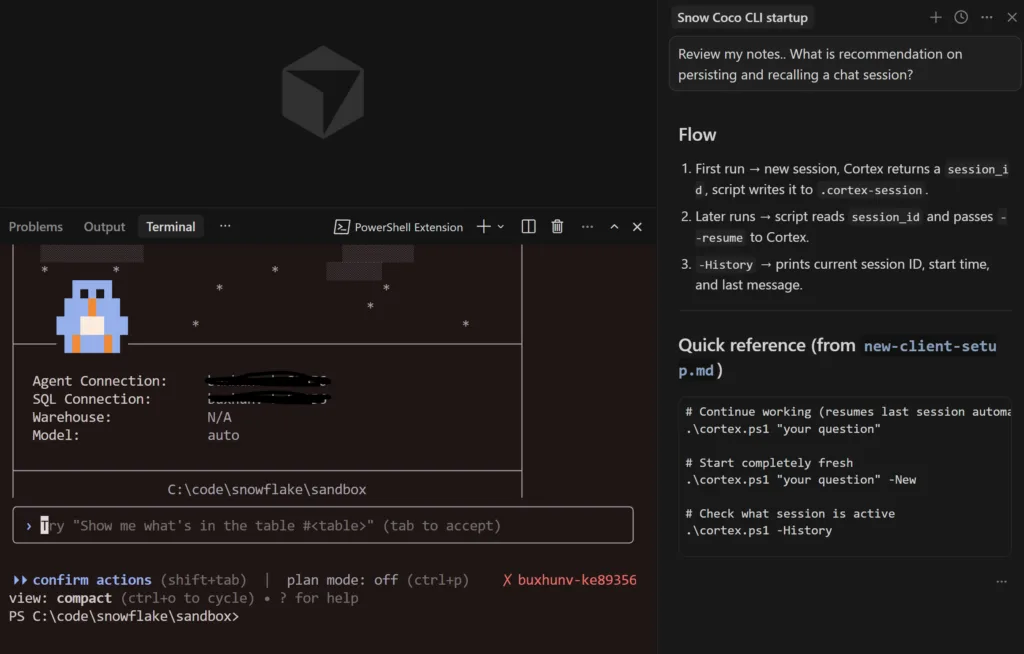
Snowflake has been evolving quickly over the least year with it’s Cortex AI offering. Snowflake CoCo is Cortex Copilot. It’s one of the clearest examples of Snowflake embracing a modern co-pilot approach that works incredibly well. They embraced several functions that I cover in my anatomy of a modern copilot article.
Instead of exporting data into external AI tools or building complicated integrations, you can now interact with your Snowflake data using natural language. The AI assistant lives directly inside the platform and works against the data already stored in your warehouse.
What Cortex Copilot Actually Does
At its core, Cortex Copilot provides a natural language interface to Snowflake. The formal Snowflake CoCo documentation covers what is supported, and I admit I haven’t read it! I jump in, ask logical questions for real production problems and I get correct answers 90%+ of the time.
Off the top of my head, here are the tasks I have successfully tested CoCo that felt frictionless.
Validating queries multiple versions of queries
Setting up a new DBT project
Migrating views and materialized views to DBT models
Troubleshooting broken SQL
Granting permissions and RBS auditing tasks
Reviewing and troubleshooting YML for semantic models
Advanced searching based on table / view structure
Text to SQL
SQL diff comparison
Validating results between queries
Why This Matters for Data Teams
Most companies have invested heavily in building modern data stacks. Data warehouses, pipelines, and analytics tools are already in place. The pace of innovation from Snowflake has moved at a rate that is impossible to keep up with. Cortex provides a level playing field where new features, documentation, and best practices for using Snowflake, DBT, and other integrations has been packaged up as skills by the Snowflake team.
AI Where the Data Already Lives
One of the biggest advantages of Snowflake Cortex Copilot is aware of schema , semantic models, administrative functions and more. As modern co-pilot it enforces role based permissions and access policies. That has has been a breath of fresh air as I invite more information workers into Snowflake Workspaces. That was something that I never would have imagined starting 2026!.
How to Enable Snowflake Cortex in Snowflake
Getting started with Cortex requires only a couple of account level configuration changes.
First, enable the Cortex analyst functionality.
ALTER ACCOUNT SET ENABLE_CORTEX_ANALYST = TRUE;
Next, allow access to the models that power the Cortex features.
ALTER ACCOUNT SET CORTEX_ENABLED_CROSS_REGION = 'ANY_REGION';
Some organizations prefer to restrict model access to a specific region. In that case the configuration can be set more narrowly.
ALTER ACCOUNT SET CORTEX_ENABLED_CROSS_REGION = 'AWS_US';
Once these settings are enabled, Cortex capabilities become available within the Snowflake platform.
Final Thoughts on Snowflake CoCo
Cortex Copilot represents a meaningful shift in how we can interact with Snowflake.
I have already wired up Snowflake Cortex Copilot CLI to work inside of Cursor. It’s not as fast, but the additional layer of planning, orchestration and micro-knowledge loops has transformed the way I work. I don’t use Claude Code, but I am sure it works the same there. If you want my template, feel free to contact me directly.
The barrier to entry to work with data is the lowest it has ever been with Snowflake CoCo! Happy coding.
What Actually Matters After Using AI for Production Productivity
Over the past year I have continued to find new peaks in productivity as a DataTools Pro. In this article, I break down some of the biggest unlocks I have experienced watching leaders build hyper growth businesses on the backs of well designed AI experiences. The common thread where I find the greatest productivity and rapid adoption is a well designed AI co-pilot… Work that requires human accountability, typically requires a human in the loop. Here are the tools I am using every day giving me move 2-5x faster than 2023.
Snowflake dev environments (Cortex Code) –
Repo-driven IDE workflows (Cursor)
Micro-Apps and prototyping (Lovable)
Product and Web Analytics (PostHog AI)
GPT / Claude chat interfaces
Video editing (Descript)
Breaking Down Features for Peak AI Co-Pilot Productivity
After dozens of experiments across tools I have attempted to apply lessons learned into our DataTools Pro, where we manage strategy, business semantics and metrics. Here is a framework that actually matters as I evaluate my own startups and what I adopt.
1. Multi-Turn Conversation
What it is
The ability to maintain context across iterative back-and-forth reasoning inside a session. It simulates short term cognitive continuity.
Without multi-turn, every request is stateless. With it, the AI remembers prior questions, assumptions, and constraints.
Why it matters
Real engineering work is iterative. You ask a broad question, narrow scope, introduce tradeoffs, refine logic. Multi-turn prevents constant context resets.
Example in action
GPT / Claude: You brainstorm architecture, refine it over 10–15 exchanges.
Cortex Code: You explore warehouse credit usage, then drill down into specific roles without re-briefing the account context.
Cursor: You modify a function, then adjust related files in follow-ups.
Lovable: You scaffold an app, then iteratively adjust schema and UI.
PostHog AI: You analyze funnel drop-offs, then pivot into retention metrics.
Multi-turn is table stakes now. But it only gives session continuity. It does not create long-term intelligence.
2. Context-Aware Reasoning
What it is
The model reasons against your environment, grounded on what you are specifically working on instead of abstract patterns based solely on the interaction itself.
Repository / code awareness
Metadata awareness
Change and usage logs
Visual awareness (screen grabs and computer vision).
App state (what you are doing in present moment or history).
Why it matters
This is the difference between “plausible” and “correct.”
Examples
Cortex Code: You ask, “Which warehouses consumed the most credits?” It generates SQL grounded in your actual Snowflake metadata.
Cursor: It refactors across your actual repo instead of hallucinating file names.
Lovable: It understands the state of the generated app and adjusts components coherently.
PostHog AI: It queries real event data to answer product questions.
GPT / Claude (standalone): Context awareness is limited to what you paste in manually.
Grounded context dramatically increases reliability and reduces hallucination.
3. Self-Reflection & Iterative Reasoning
What it is
The system critiques or refines its own output instead of stopping at first completion. This is effectively a quality control layer.
Why it matters
Speed without reflection creates brittle systems. Reflection increases decision quality.
Where we’ve seen this
PostHog AI: Agent loops evaluate output and adjust before finalizing analysis.
Cursor (partial): When prompted explicitly, it can compare approaches and refactor more carefully.
GPT / Claude: Capable, but requires manual prompting (“critique this”).
Cortex Code: Typically direct generation, not built-in critique loops.
Lovable: Focused on generation speed over architectural reflection.
Reflection is not default behavior in most tools. It has to be engineered or prompted
5. Agent Workflows & Task Loops
What it is
The ability to break down an objective function and execute step-by-step with intermediate evaluation is how most people problem solve and execute. Agents that summarize work before execution creates a much better experiences in my opinion.
Why it matters
This shifts AI from “answering questions” to “completing tasks”; one day completing goals
Strong examples
Cursor: Multi-file planning and stepwise refactors.
Lovable: Full-stack app scaffolding from high-level instructions.
Cortex Code: Less agentic, more query-focused based on questions.
GPT / Claude: Capable but requires manual orchestration.
This is where copilots begin to feel like collaborators instead of search engines, is when they demonstrate understanding. Breaking down problems into its smallest parts and recommending next steps is where you truly feel like you have a “co-pilot.
Exciting Innovations I’m Looking for in an AI Copilot
After running these systems in real workflows, I look for 3 capabilities will make co-pilots even more useful!
Controlled and Secured Autonomy with Safe Reversion
As AI edits files, runs queries, or executes workflows, autonomy increases. AI accesses data it shouldn’t have. How do you recover? That is the “trust layer” that needs to be engineered at every layer of your technology stack.
A mature system must provide:
Suggest-only mode
Controlled edits
Test execution
Refactor execution
Deterministic rollback
Trust is built through reversibility.
Cursor approaches this through diff visibility. Most others still lack robust autonomy controls.
Persistent Structured Memory
Long term cognitive continuity.. (Long-Term Cognitive Continuity). For now, I am collecting a mountain of “know how” in the form of MD files and knowledge bases across multiple domain specific tools. ChatGPT is still my favorite to recall fragments of work and reasoning.
A fun experiment is open ChatGPT and ask
What is it like to work with me? What are my top 3 strengths and what are my top 3 weaknesses.
What We’ve Learned from Lab Experiments
Embedding AI copilots into production workflows shifts the evaluation criteria. AI feels magical until you know what the output should be. That is why I look to best of breed co-pilot experiences as the guiding light for what I should working toward.
Multi-turn was the first wave. Agent workflows were the second. The next frontier is institutional intelligence where AI not only reasons in the moment, but compounds over time. That is why our investments in DataTools Pro from day 1 has been cultivating business semantics from existing systems of record (Salesforce) and systems of understanding (Snowflake, Tableau).
This weekend, I did a real world Microsoft Copilot vs Claude vs ChatGPT bakeoff while wrapping up a lead magnet calculator. In preparation for a Microsoft call to discuss an AI Copilot rollout, I wanted some hands on experience.
The Bakeoff Workflow
Take a detailed calculator requirements doc (AI generated from source code).
Recreate a simplified version in Excel via prompt.
Document the structure.
Translate the workflow into an executive ready PowerPoint story.
Use the output as preparation for a Copilot rollout conversation.
This would be a day of work for multiple people. The project was complete in less than an hour.
Phase One: Translating the App into Excel
The spreadsheet needed:
Clear input structure supplied by a 400 line markdown file.
Clean calculation logic
Organized output summary
Executive ready formatting for review and sign off
Microsoft Copilot
Claude
ChatGPT
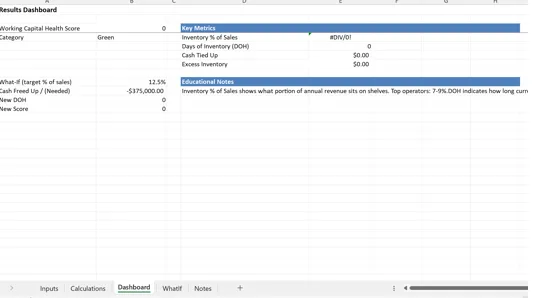
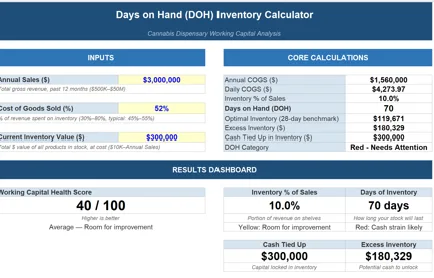
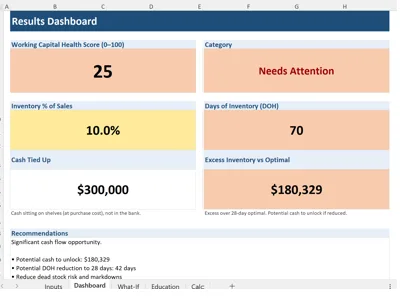
Copilot fragmented the logic across multiple tabs. Inputs and outputs were not logically grouped. Structural coherence was inconsistent. If an AI tool creates cleanup work, the productivity gain erodes immediately.
Claude generated a tight, single page spreadsheet. Inputs were grouped cleanly. Calculations were centralized. Outputs were summarized clearly. It felt intentional and the result was the best of the group.
ChatGPT produced a multi tab structure with clear separation between inputs, logic, and results. It was operationally sound and logically organized. It required slightly more navigation than Claude’s single page approach, but the structure held.
Phase Two: Explaining the Build in PowerPoint
I have never been a fan of PowerPoint. It is a corporate time and knowledge sinkhole. My hope is one day data / knowledge management tools paired with LLMs will force PowerPoint to evolve or go away.
PowerPoint exists as a corporate knowledge artifact that memorializes a point in time. In concept that would be a great thing if the real story and context wasn’t lost in meetings and presentations where PowerPoints are delivered. Microsoft has all of the pieces to the puzzle, so I am blown away they haven’t put it all together.
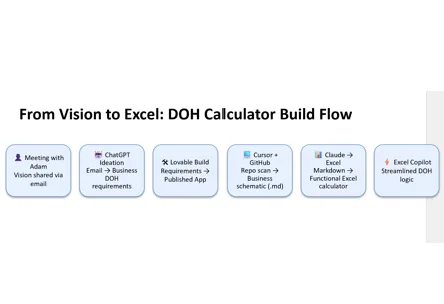
Clearly this stress test wasn’t going to be transformational to my way of working… At minimum, I wanted to produce a single slide that would explain my app design workflow, to highlight how I was using AI.
How the idea evolved
How AI accelerated development
Where structure improved
Where friction was eliminated
Microsoft Copilot
Claude
ChatGPT
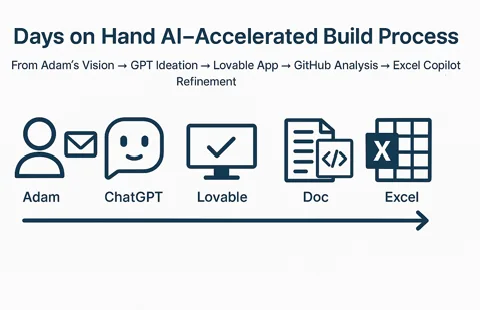
Copilot generated an image instead of an editable diagram. My issue is when shapes cannot be modified, it becomes static decoration. Even the text was encoded as text which is annoying.
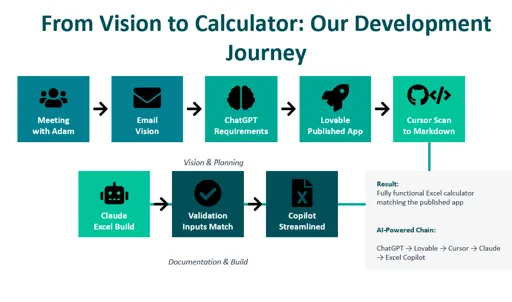
Claude produced a comprehensive diagram with strong narrative flow. It mapped the journey clearly and felt cohesive. Text was editable.
ChatGPT generated a simpler diagram, fully editable in PowerPoint. Less polished, more modular.
My findings with Microsoft Copilot so far..
Copilot’s core advantage is integration within Microsoft 365. Outlook was not part of this evaluation but I am praying when I get to the proof of value, it is the star of the show. The Excel and PowerPoint experience was underwhelming for creation. However, I did use co-pilot to evaluate and edit my Claude produced Excel. It did a great job with that task.
Adoption fails when cognitive load remains unchanged. Frustration happens when more time and cognitive load are required than the previous solution.. Without a major payoff in the form of pain reduction or value creation, its tough to recover.
Bottom line: Claude felt magical, and Copilot felt like something I experienced 18 months ago in ChatGPT. Enterprise platform alignment with Office and Azure, security, and wider distribution are real value drivers. That feeling of being behind could make this an acceptable solution.
My Strategic Criteria for Evaluating Copilot
Productivity and Communications Compression Across Microsoft 365
Copilot’s primary strategic function is to compress knowledge work inside the Microsoft ecosystem. Copilot is not designed to replace core application functions; it is designed to accelerate them.
When it comes to communication (Email and Teams), my hope is Copilot will clearly increase the velocity of information consumption and delivery. If not, upcoming proof of value exercise could be short lived.
My primary objectives as I evaluate CoPilot…:
Streamline Email search (Gemini in GMail has been a game changer).
Speed to response via email
Shorten drafting cycles.
Consolidation of meeting summary tools into 1 repository.
Speed spreadsheet modeling
Automate presentation generation
Provide a secure, standardized AI layer across the organization
Security is a major concern for every operator and executive when it comes to these AI models. Copilot provides at least one controlled AI entry point with potential access to confidential data.
My Biggest Concerns as I Continue exploring
Training focused on value creation – Understanding the span of capabilities is important but connecting business challenges to tech is where we will create value.
Clear use case alignment- The gap between expectations of possibilities, and real feature availability is a concern I want to remove early.
Adoption Management – If users do not adopt, it is a failure. If Co-Pilot fails, we are going to do it fast and move on to the next alternative.
Without high value use cases, adoption, and education AI becomes just another data tool that blames bad data or process rather than becoming an enabler that reduces operational drag.
Final Take
AI productivity is not about who generates prettier demos. Real AI success requires distribution of knowledge and experience across a team. Data alignment and influence are about getting a group of people rowing at the same speed and in the same direction. AI is the same data activation and knowledge delivery exercise as analytics, so I feel well equipped to take it on!
There are many other bright spots for Microsoft and AI including the work I have done in Azure and recently with Power BI MCP Server at BIChart.
In this test, Claude shined the brightest. I am still excited to do a proper CoPilot proof of value and see how it goes!
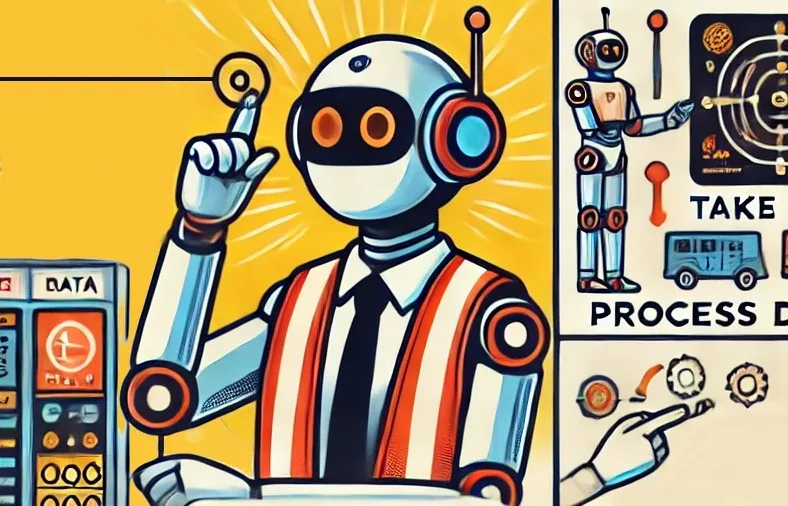
The skills to build AI agents are the same skills you need to build and train human agents to perform discrete tasks. Simply break away from technology jargon and focus on your people, data, and processes. To help refine your skills in building AI agents and make it feel less overwhelming, we will take a step back and ask the most important questions you need to answer to build AI agents.
What is an AI agent?
An AI Agent is a system that autonomously or semi-autonomously perform tasks and make decisions and potentially take action on behalf of humans, leveraging artificial intelligence technologies.
Why build AI agents?
The answer to why you should implement AI agents should have nothing to do with Salesforce releasing AgentForce, OpenAI releasing a slick new agent features, or Microsoft offering discounts on Co-Pilot. To answer the question “why build AI Agents” you should start asking questions to uncover what is impeding your your human agents productivity and effectiveness?.
Why are your human agents (front line, customer facing workforce):
lacking capacity to be pro-active
making mistakes
slow to respond
losing track of work
overworked and not hitting goals
inconsistent in results
unhappy with system and process
This exercise to uncover real proof of value should start with these questions where you prioritize the answers that directly impacts your customer experience which in turn translates to your ability for winning and keeping customers (revenue).
How to build AI agent
Designing agents is like designing the perfect, detailed job description. I use “Agent” generically to describe what a human or AI agent will do. You can use the following guideline to build criteria for your AI agent using human-like requirements.
Agent Roles
Role Name: (E.g., Service Agent, Sales Development Representative, Personal Shopper)
Primary Responsibilities: (What are the main tasks this agent will perform? List as specific actions or responsibilities, e.g., answering customer queries, scheduling appointments, providing personalized product recommendations.)
Key Outcomes: (What should the agent achieve? Examples: reduce resolution times, increase lead engagement, improve customer satisfaction scores.)
Required Skills
Pre-Built Skills: (List skills that can leverage existing capabilities, e.g., order tracking, FAQ handling.)
Custom Skills: (Detail skills that need to be tailored, e.g., understanding specific industry jargon or navigating proprietary systems.)
Terminology and Training Needs: (What terms, processes, or context must the agent understand? E.g., acronyms, product features, refund policies.)
Data Access
Data Sources: (What databases, CRMs, or external systems does the agent need to access? Examples: Salesforce, Data Cloud, external knowledge bases.)
Type of Data Needed: (What specific data is required? Examples: order history, customer profile, product inventory, lead scores.)
What does an AI agent do?
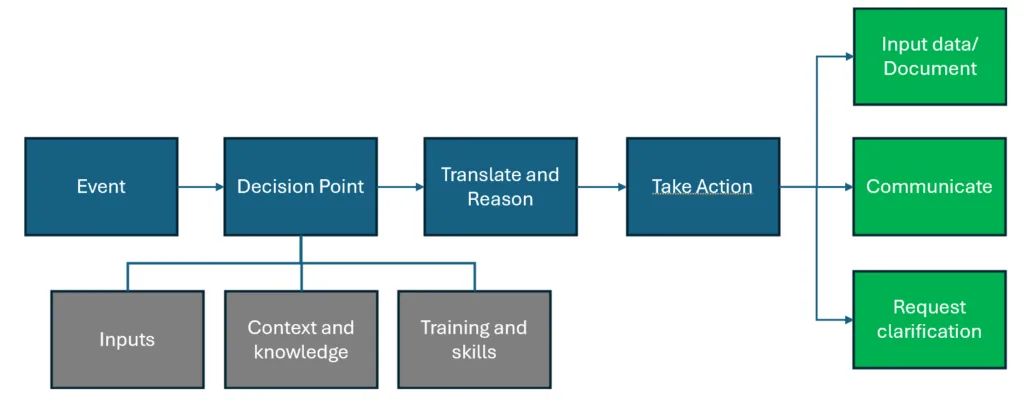
An AI Agents are designed to autonomously or semi-autonomously complete tasks while drawing from a body of knowledge and experience. A lot of discrete tasks that your human agents complete day to day follow this basic pattern which can be created as an agent.
How does Salesforce AgentForce follow this process?
1. Event (Trigger):
Agentforce Equivalent: In Agentforce, an event is be initiated by a customer inquiry through channels like web chat, messaging, or email platforms.
2. Decision Point:
Agentforce Equivalent: This corresponds to the Agent’s reasoning process, where it determines the appropriate Topic to address the customer’s inquiry.
3. Translate and Reason:
Agentforce Equivalent: Within the selected Topic, the Agent utilizes Instructions and Actions to interpret the inquiry and decide on the next steps.
4. Take Action:
Agentforce Equivalent: The Agent executes predefined Actions (such as Flows or Prompt Templates) to respond to the customer’s needs.
What makes AI agents different?
Unlike traditional rule-based systems, AI agents use machine learning, natural language processing, and other AI techniques to adapt to changing conditions and optimize their actions in real-time, often in the absence of explicitly declarative rules.
AI agents need to be designed to operate securely and effectively by implementing guardrails that define their roles, control data access, and enable human oversight for complex tasks. The same way you have a manager monitor a new employee, you need to provide systemic oversight to an agent.
Defined Scope and Roles:
Clearly define what tasks the AI agent can perform and establish boundaries to prevent unintended actions. Example (Agentforce): Agentforce uses “Topics” and “Instructions” to specify tasks, such as order management or answering FAQs, and restricts actions beyond these roles.
Secure Data Access and Permissions
Limit data access to what is necessary for the agent’s tasks, ensuring compliance with security policies. Example (Agentforce): Agentforce integrates with Salesforce’s permission sets and field-level security to prevent unauthorized access to sensitive customer data.
Human Oversight and Escalation
Build workflows that allow seamless escalation of complex or sensitive tasks to human agents for final decision-making. Example (Agentforce): Agentforce agents include escalation protocols to transfer cases to human agents when issues exceed their defined capabilities or require approvals.
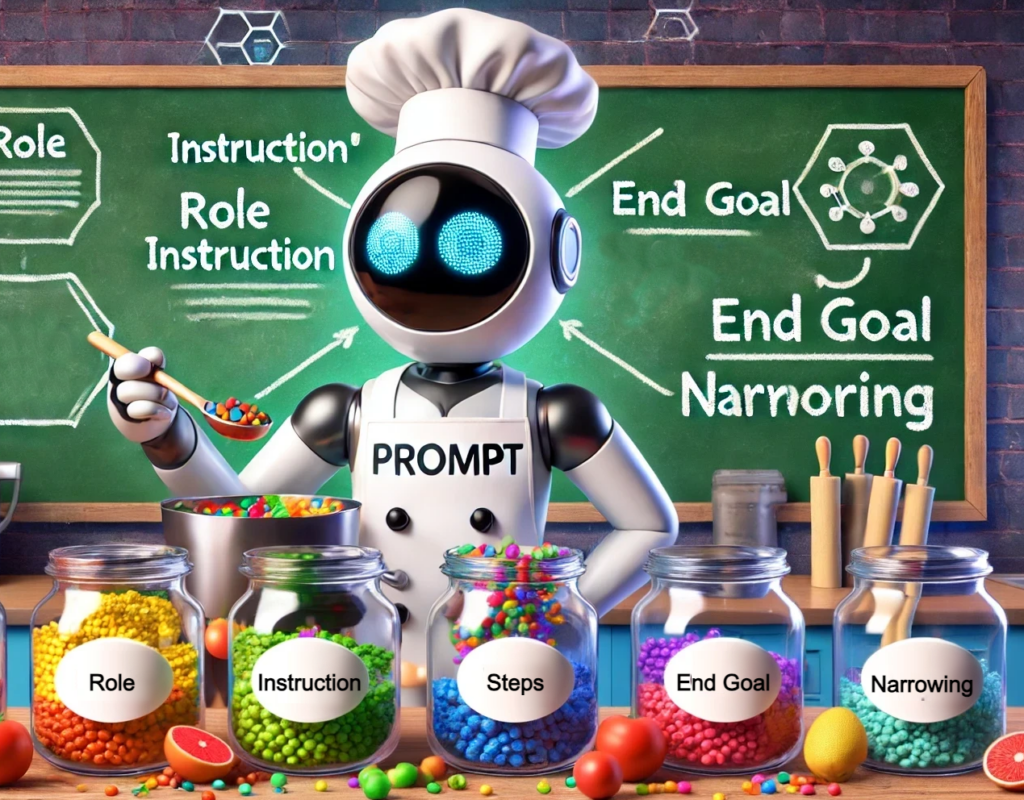
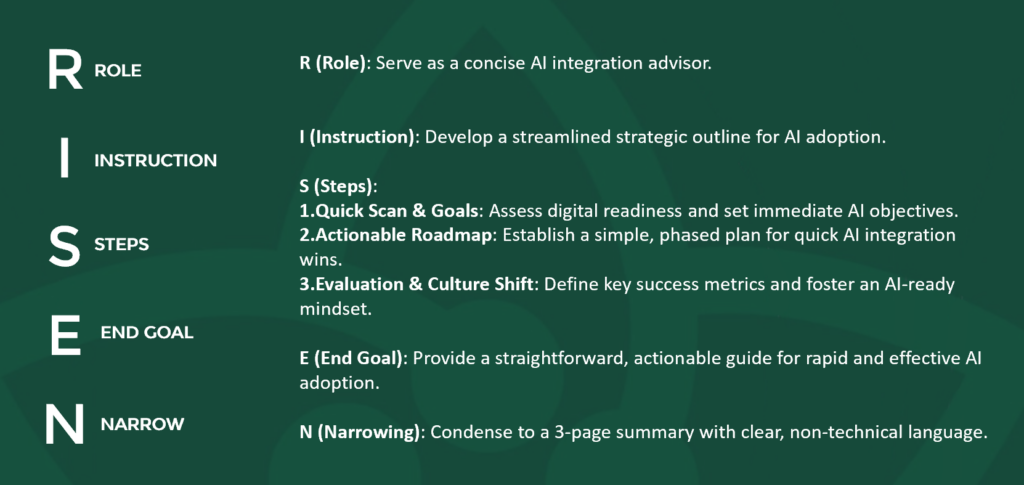
The design of prompts plays a pivotal role in determining the success and efficacy of large language model chat bots. Prompt design encompasses various elements that contribute to optimal AI performance whereby having clear and concise instructions improves the result. One of the frameworks that encapsulates these essential elements is RISEN, which stands for Role, Instruction, Steps, End Goal, and Narrowing.
I first learned about RISEN while searching for formal prompt design frameworks mostly because there was limited credible guidance. The origins of RISEN can be credited back to Kyle Balmer on his promptentrepreneur TikTok channel. In the world of data and analytics, we have used LLMs to translate and convert business and data requirements:
R.I.S.E.N Prompt Components
Role: Ensures AI understands the role it needs to play for accurate responses. Example: Act as a data consultant proposing a comprehensive strategy for implementing Salesforce Data Cloud in an organization.
Instruction: Provides clear directives to guide the AI’s actions. Example: “Develop a proposal outlining the strategy, benefits, and implementation plan for Salesforce Data Cloud.”
Steps: Outlines the specific steps or components to follow. Example:
Start with an executive summary explaining the purpose and importance of Salesforce Data Cloud.
Detail the key benefits of adopting Salesforce Data Cloud.
Outline the step-by-step implementation plan, including data migration, integration, and user training.
Provide a timeline and budget estimate for the implementation.
Conclude with potential challenges and mitigation strategies.
End Goal: Defines the desired outcome of the prompt. Example: Create a comprehensive proposal that convinces stakeholders of the value and feasibility of implementing Salesforce Data Cloud, ultimately leading to project approval and execution.
Narrowing: Sets constraints or requirements to refine the output. Example: The proposal should be 2,000-2,500 words, use professional language, and include relevant data and case studies to support the arguments.
Final RISEN Prompt
The final compiled prompt looks like the following. Give it a shot in your AI Chatbot of choice!
Act as a Salesforce consultant proposing a comprehensive strategy for implementing Salesforce Data Cloud in an organization.

Develop a proposal outlining the strategy, benefits, and implementation plan for Salesforce Data Cloud.

Start with an executive summary explaining the purpose and importance of Salesforce Data Cloud.

Detail the key benefits of adopting Salesforce Data Cloud.

Outline the step-by-step implementation plan, including data migration, integration, and user training.

Provide a timeline and budget estimate for the implementation.

Conclude with potential challenges and mitigation strategies.

Create a comprehensive proposal that convinces stakeholders of the value and feasibility of implementing Salesforce Data Cloud, ultimately leading to project approval and execution.

The proposal should be 2,000-2,500 words, use professional language, and include relevant data and case studies to support the arguments.
Challenges in AI Prompt Design
Despite its importance, AI prompt design presents several challenges…
Context Sensitivity: Designing prompts that are contextually relevant and sensitive to user intent can be challenging. Not all AI chatbots are built alike and the underlying data and context can vary.
Balancing Simplicity and Complexity: Finding the right balance between simple prompts for user understanding and complex prompts for detailed interactions is challenging. For example, in a financial planning AI, balancing prompts that are easy to understand for general users while providing in-depth analysis for financial experts requires careful design.
Dynamic Interaction: Designing prompts that adapt dynamically to user input and feedback can be complex. For instance, in a recommendation system, prompts need to evolve based on user preferences and interactions to deliver personalized recommendations effectively. For example, OpenAI’s ChatGPT has been designed per chat session to maintain continuity over time.
Multimodal Interaction: Integrating multiple modes of interaction, such as voice, text, and imagery, into prompt design adds complexity and opportunity for increasing context beyond what you can type. “A picture is worth a million words” which holds true for multi-modal generative AI.
Cultural Sensitivity: Designing prompts that are culturally sensitive and inclusive requires consideration of diverse user backgrounds and preferences. For example, in a language translation AI, prompts need to account for linguistic nuances and cultural differences to avoid misunderstandings.
Despite these challenges, the RISEN framework provides a structured approach for interating with large language models while optimizing prompt design.
Bottom Line on Prompt Design
While crafting prompts for AI can be tricky, the RISEN framework and consistent approach to build good prompts. By focusing on role, instruction, and other key principles, you can confidently tackle any large language model chat bot and extract maximum value!
What truly propels an organization to the forefront of technological innovation? Is it the meticulous governance and curation of data, or is it the deployment of sophisticated AI chatbots and Large Language Models (LLMs) capable of digesting, synthesizing, and translating this data into actionable insights?
This pivotal question marks the forecourt where two giants from our March Madness tournament face-off: Data Management and Artificial Intelligence.
This blog is going to take us on an interesting adventure. We’re going to look closely at two big players in the world of technology: data management and AI-driven chatbot technology.
We’ll explore what makes each one special and compare them based on their efficiency outcomes within enterprises. We will also discuss how organizations can leverage both to achieve maximal operational efficiency.
So, the court set, and the stakes are high.
Will the precision and order of top-notch data management take the crown, or will the speed and adaptability of AI chatbots and LLMs win the day?
Welcome to the crucible of efficiency, where the March Madness of technology unfolds. 🆚🏀
Data Management
In the ever-evolving digital landscape, “data management” has transcended mere buzzword status—it now stands as a foundational pillar for modern businesses. But what exactly does it entail?
According to Wikipedia, data management encompasses any discipline related to handling data as a valuable resource. It involves managing an organization’s data to facilitate informed decision-making.
The umbrella of data management covers a wide array of practices, including Data Governance, Data Observability, Data Integration, and Data Sharing. Its expansive scope underscores its pivotal role in today’s enterprises, where data-driven insights steer actionable strategies.
The economic impact of data management is equally staggering. Grand View Research reports that enterprise data management raked in a whopping $85.55 billion in 2022 and is projected to soar to $170.46 billion by 2029.
AI Chatbots & Co-pilots
Empowered by large language models, we are going to see AI enabled chatbots change the landscape for customer service and engagement, ushering in an era of seamless chat-based interactions. With a projected market value soaring to $1.3 billion by 2025, AI chatbots stand at the forefront of redefining customer experiences
The allure of AI chatbots lies in their speed, availability, and personalized approach to customer engagement. Capable of handling a vast volume of interactions, they swiftly provide tailored assistance, enhancing operational efficiency and user satisfaction.
Ladies and gentlemen, as the curtain rises, let the showdown between data management and AI chatbots commence!
The Efficiency Showdown: Data Management vs. Chatbot Assistants
As we gaze into the efficiency spectrum of technology in 2024, two prominent players are under the spotlight for their potential to streamline operations and enhance customer engagement: Data Management and Chatbot Assistants.
Let’s use the following as our yardstick for efficiency measurements.
1. Time-Saving Capabilities
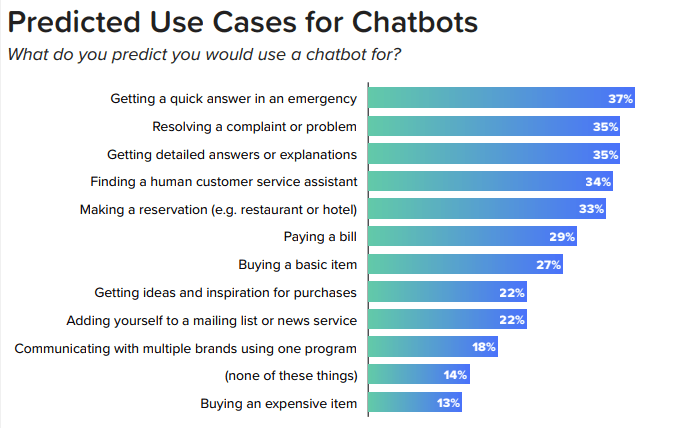
Chatbot Assistants: They take the lead with their ability to provide instant responses, a critical factor as surveys indicate customer frustration with long wait times. Chatbots efficiently reduce wait times, offering swift service that keeps pace with the digital era’s demands.
Data Management: While pivotal for informed decision-making, it doesn’t directly influence customer-facing response times, focusing instead on backend data organization and analysis.
2. Cost-Effectiveness
Chatbot Assistants: Shine brightly here, with significant cost savings estimated at around $11 billion in 2022, a number only expected to grow. By automating customer service, chatbots can slash costs by up to 30%, showcasing their financial efficiency.
source: Digital Marketing Community
Data Management: Its contributions to cost-effectiveness come indirectly, through the optimization of business operations and strategic planning based on data insights.
3. Scalability
Chatbot Assistants: Excel in handling unlimited customer interactions simultaneously, making them incredibly scalable and capable of managing vast amounts of feedback and inquiries without the need for proportional increases in human resources.
Data Management: Scalability is more about managing growing data volumes and ensuring the system can expand to meet analytical demands, which is crucial but operates behind the scenes.
4. Customer Satisfaction and Experience
Chatbot Assistants: Offer 24/7 availability and quick responses, but they may struggle with complex queries that require a human touch, affecting customer satisfaction in nuanced interactions.
Data Management: Doesn’t directly interact with customers but plays a crucial role in understanding customer behavior and preferences through data analysis, indirectly influencing customer experience by informing business strategies.
Both Data Management and Chatbot Assistants hold substantial potential for improving efficiency, each in their individual domains. Chatbot Assistants shine in terms of immediate customer interaction, scalability, and cost-effectiveness, while Data Management is pivotal in structuring, securing, and leveraging data for informed decision-making.
As the technological landscape continues to evolve, the integration of these two can lead to even greater efficiency gains, with chatbots benefiting from the rich insights derived from sophisticated Data Management systems.
The verdict in this showdown suggests that while chatbots may lead to direct customer interaction efficiency, the synergy of combining Data Management and Chatbot Assistants could offer the best of both worlds.
The Synergy Effect: Integrating Data Management and AI Co-Pilots
AI co-pilots are getting really good at chatting with customers. They don’t just follow scripts; they understand what your customers are saying, figure out what they need, and even learn from each conversation.
This means whether someone’s shopping at 2 PM or 2 AM, they get quick and smart help, no waiting needed. Tools like Zendesk and LivePerson show us how it’s done by mixing AI smarts with a human touch for tricky questions, making sure every customer walks away happy.
Then there’s the data magic. When you mix AI co-pilots with your business data, you get something special. These co-pilots can look at a customer’s history, know what they like, and make suggestions that hit the mark, turning a simple chat into a personalized shopping spree. It’s like having a salesperson who knows your customers as well as their best friends do.
So, what’s the big deal about mixing Data Management with AI co-pilots? It means businesses can offer help anytime, understand customers better, and make shopping online as friendly and personal as walking into your favorite local store. It’s not just about answering questions faster; it’s about making every chat feel like it’s between good friends.
When this intelligence is powered by robust Data Management, the synergy amplifies. A case in point is Amtrak’s “Julie,” which leveraged this synergy to handle 5 million inquiries annually, boost bookings by 25%, and slash customer service costs, demonstrating the practical benefits of integrating AI co-pilots with data insights.
Strategic Implementation and Measuring Success
To make sure Data Management and AI co-pilots hit the mark in your business, it’s all about mixing the smarts of AI with the solid ground of Data Management. You’ve got to find the right people who know their way around AI and machine learning. With the demand for these skills skyrocketing, it’s clear they’re key players in getting things set up just right.
When it comes to seeing if all this tech is doing its job, keep an eye on the numbers that matter like how happy your customers are, how fast they’re getting help, and how many are chatting away with your AI co-pilots. With the right tools, you can track these signs of success, tweak things as needed, and make sure your AI buddies are pulling their weight.
Data Management vs AI Chatbots Conclusion
Throughout this discussion, it’s clear that both Data Management and AI co-pilots are pivotal in advancing operational efficiency. The strategic integration of these technologies is not a one-size-fits-all solution but rather a tailored approach that considers the specific needs and contexts of each business. As the digital landscape evolves, so too will the tools we use to navigate it, leaving the door open for continued innovation and refinement.
Share your thoughts in the comments below. How have these technologies impacted your business? What strategies have you found most effective? Your experiences and insights are valuable to this conversation.