This month, I took on a new feature released by Salesforce for multi-platform support. The support for React in Salesforce and now headless for AI apps is very exciting news. Now, our modern agentic workflows can connect and speed up deployment inside of Salesforce. I wanted to see how fast I could deploy our compensation management DataTools inside of Salesforce. Within a couple of days of experimentation, we have a fully custom React application directly inside Salesforce Lightning Experience, connected to live Salesforce data.
Here’s what I built, how it was built and how it will shape the value engineering work I do for clients using Salesforce.
New React dev for an existing app: Commission Management
Months ago, we built our own Commission Management DataTools that runs natively inside Salesforce. It was an internal R&D project that I built after building a client MVP. Commission management is actually a data and analytics first initiative that is wrongly scoped and built. Most companies build compensation in Excel. Many companies have solved this problem and Salesforce acquired one of them called Spiff. The level of effort to build these solutions requires deep domain expertise, and we have it in house.
Our commission management app includes:
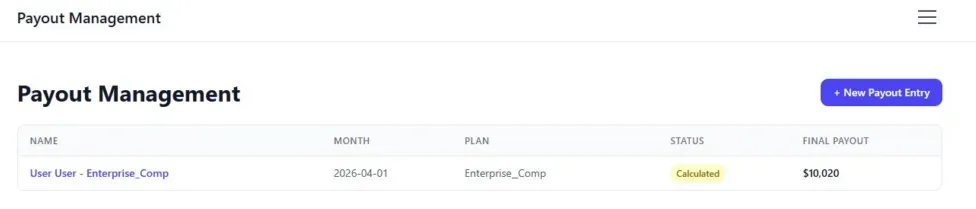
- Payout List View: A clean table showing payout records with status badges, amounts, and one-click navigation
- Payout Detail View: A detailed breakdown of each payout, including calculations, attainment, team metrics, and final payout amount
- Payout Entry Form: A smart two-step form that loads the correct fields based on the selected compensation plan, then creates the record directly in Salesforce
- Commission Reporting: Simple Salesforce reporting and dashboards for sales and finance
Rebuild in React
The question was could we vibe code the same solution in React and run it inside of Salesforce? After a short learning curve, the answer is yes!
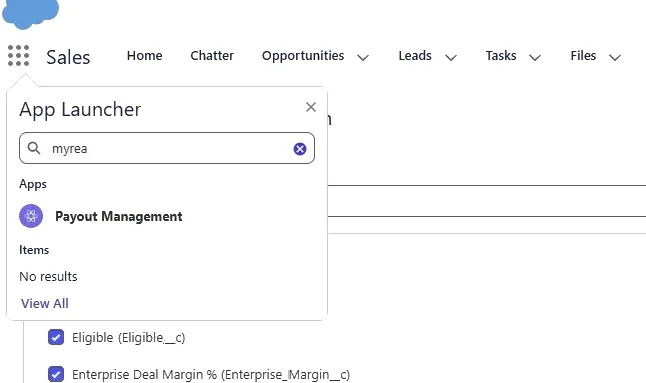
Payout List page:
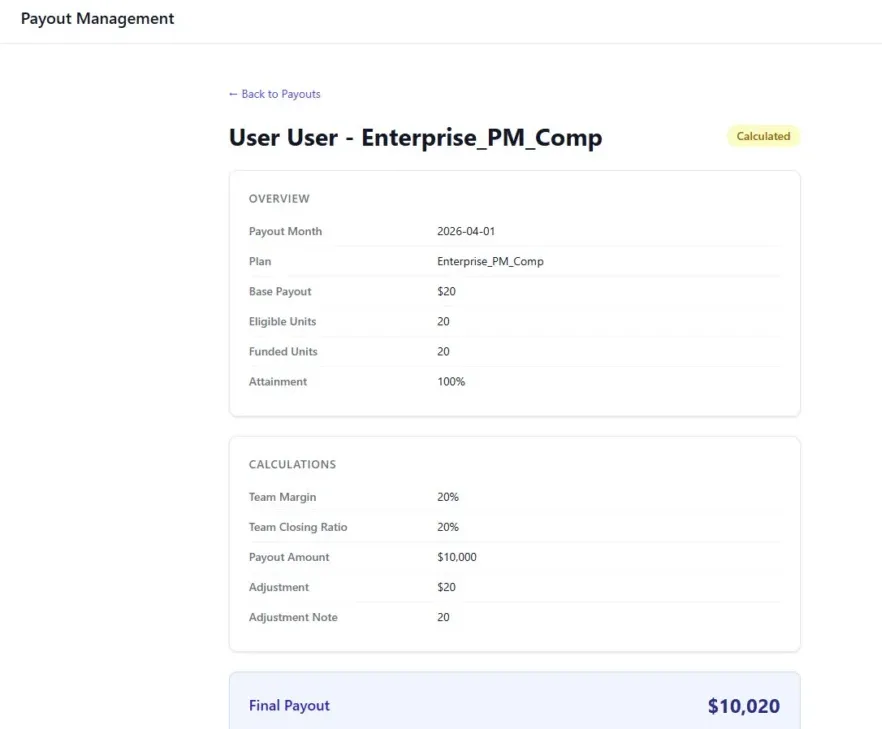
The Technology Behind React in Salesforce: Salesforce UIBundle
This project was made possible by Salesforce UIBundle, a relatively new and still evolving feature that allows you to deploy a React app as a Salesforce metadata component. Instead of hosting the app on an external server, it lives inside the Salesforce org and is served directly through Salesforce Lightning Web Runtime.
The app was built with:
- React and TypeScript
- Vite for front-end builds
- Tailwind CSS for styling
- Salesforce
@salesforce/sdk-datafor working with live Salesforce data
The Data Layer: GraphQL for Reads, Apex REST for Writes
One of the most interesting parts of this project was designing the data layer for a React UIBundle app inside Salesforce.
For reading data, we used Salesforce’s UI API GraphQL endpoint, the same technology that powers much of Lightning Experience. That gave us a clean and efficient way to query payout records and related values.
For writing data, we discovered that the GraphQL mutation route had limitations when working with custom object fields. To solve that, we used authenticated calls to a lightweight Apex REST API. The Apex controller accepts writable fields dynamically, handles type coercion, and avoids hardcoded field mappings.
That combination turned out to be the most reliable and maintainable approach:
- GraphQL for reads
- Apex REST for writes
GraphQL query code example
graphql
query GetPayouts {
  uiapi {
    query {
      Sales_Payout__c(first: 50) {
        edges {
          node {
            Id
            Status__c { value }
            Final_Payout_Calc__c { value }
          }
        }
      }
    }
  }
}
A Plan-Driven Entry Form – Meta Data powered Apps
Our compensation payout entry forms are now fully meta-data plan-driven. This approach puts the power in business leader’s hands where changes can occur monthly.
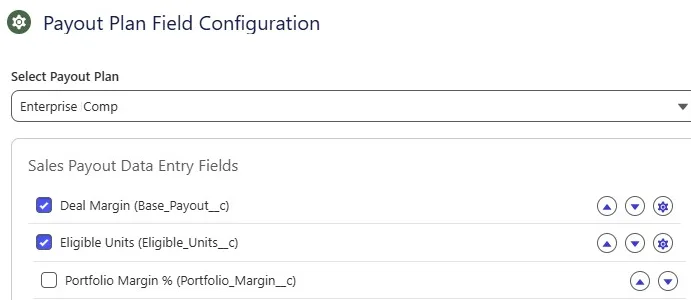
Each compensation plan, such as Senior Sales Director, has its own data entry configuration stored in a custom Salesforce object called Payout_Plan_Field_Config__c.
When the user selects a plan and clicks Next, the app retrieves that configuration in real time and renders only the relevant fields for that plan. There is no hardcoding and no need to rebuild the app when plan requirements change.
The only remaining step for Salesforce admins is adding or remove fields for a plan directly in Salesforce, and the form updates automatically.
Payout_Plan_Field_Config__c records in Salesforce:
The Full Salesforce Metadata Stack
Behind the React UI, we still get to work with a strong Salesforce foundation. As an example, our commisison app still has:
- Custom Object: with fields for payout data, calculations, and status tracking
- Custom Object: for plan-driven field definitions
- Custom Metadata Types: metadata records for plan and tier configuration
- Apex Classes for calculations, entry handling, plan administration, and reporting support
- Apex Trigger: to run automatic calculations on save
- Lightning App: with dedicated tabs
- Flex Pages and Layouts for native Lightning integration
- Lightning Web Components Now we can design the best solution for the job to re-evaluate our lighting web components and pages for for payout, statements, and analytics.
- Permission Set for secure field-level access across custom objects
Everything was built using Salesforce DX, managed in Git, and deployed using a scratch org workflow.
Why This Matters for Salesforce Teams
This project proves an important point: you do not need to leave Salesforce to deliver a modern, highly customised application experience.
For organisations that need:
- A custom applications built directly on top of the Salesforce relational model.
- A React-based UI with a modern user experience inside Lightning Experience
- Full control over their data without external SaaS tools, sync issues, or extra licenses
- A configurable system that admins can manage themselves
- Agentic workflows tools, and automation is adaptable to Salesforce.
We can’t wait to see how this evolves and materializes with Salesforce own native builder / vibe coding capabilities vs Cursor and Claude code solutions I use today.
- Commission tracking
- Team and AI agent onboarding workflows
- Custom approval interfaces
- Advanced analytics exploration tools (not to be confused with dashboards / BI)
- Client-facing internal tools
- Salesforce-native operational apps
Want Something like this in Your Salesforce Org?
If you are using Salesforce and have been told, “That is not possible in Lightning,” or “You need a third-party tool for that,” it may be time for a different conversation.
At DataTools Pro, we specialise in building advanced Salesforce solutions that stay maintainable, secure, and fully aligned with your existing Salesforce investment.