DataTools Pro AI BI Blueprint

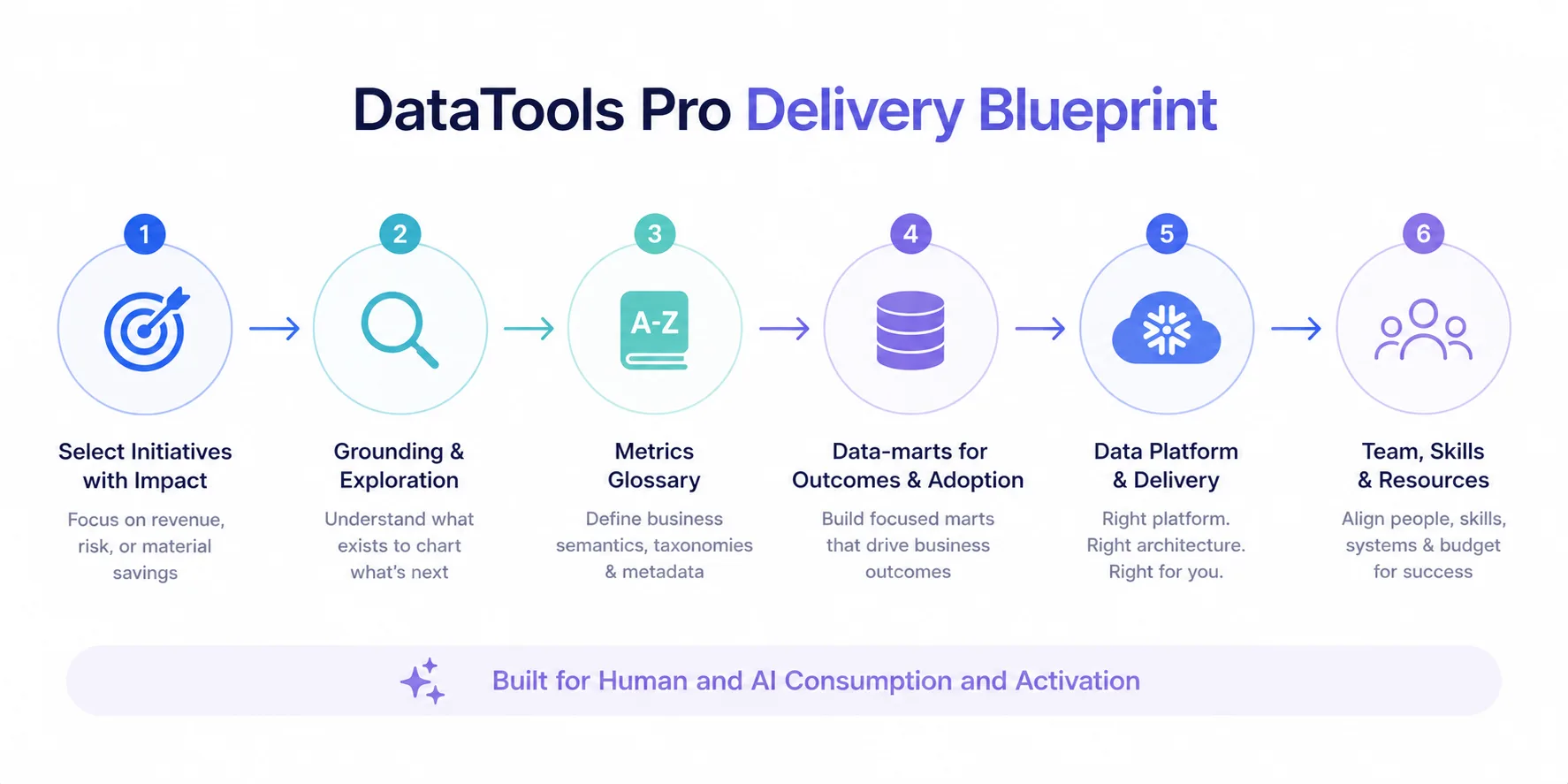
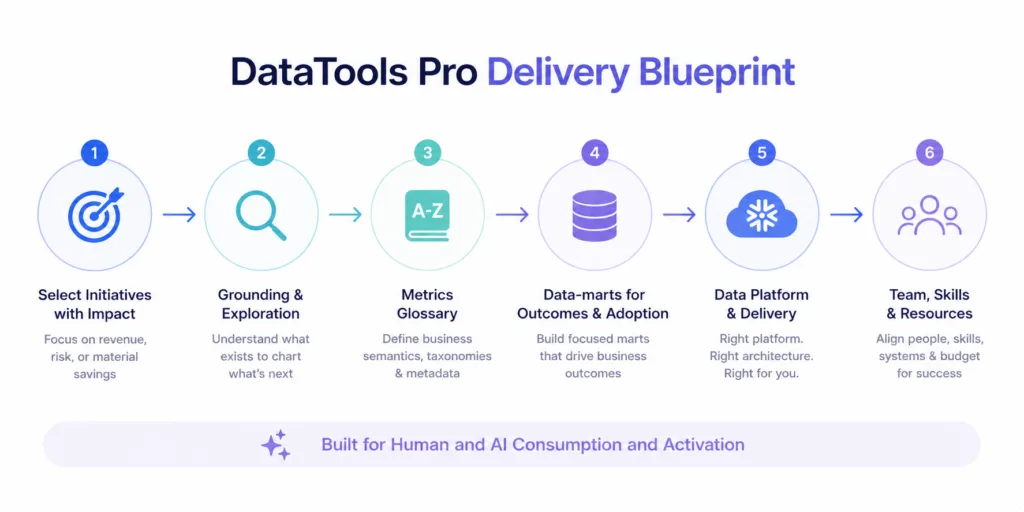
DataTools Pro Delivery Blueprint: a six-step flow from selecting initiatives to building team and resources.

We have spent twenty years building analytics systems that people actually trust. The last three years taught us what happens when you put AI on top of a strong BI foundation. Most AI deployments fail before they start. Not because the technology is wrong. Because the data underneath it is ambiguous, inconsistent, and disconnected from how decisions are made. We have our DataTools Pro AI Blueprint to help fix it quickly.
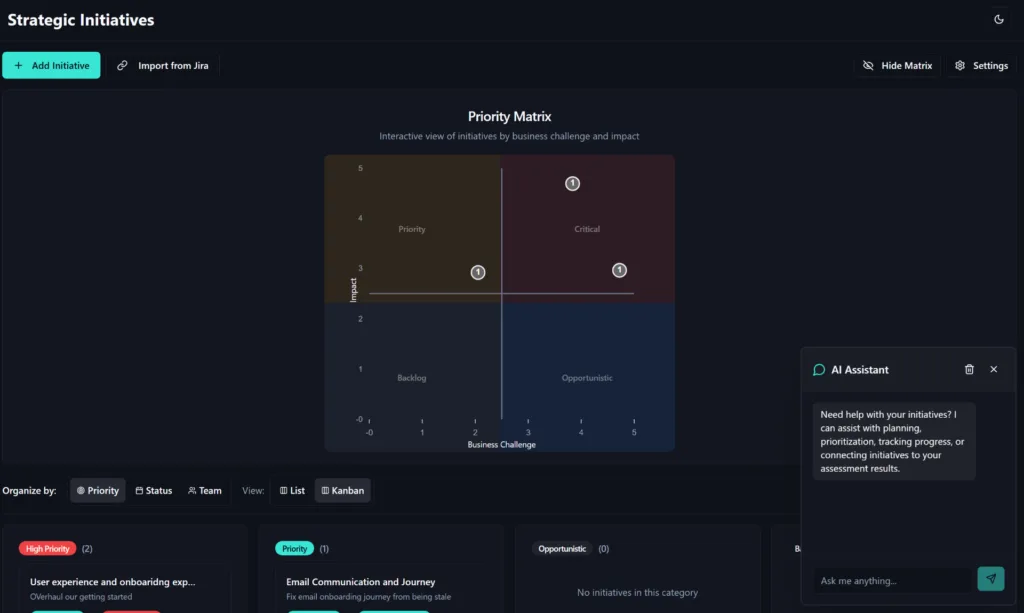
DataTools Strategy and Initiative Planner

Select Initiatives with Impact: Deliver solutions that matter

We build models and tools that are aligned to high frequncy, 5 -7 figure decisions related to revenue and risk. There are plenty of opportunistic problems we solve along the way. However, without something high impact, it’s not worth embarking on the journey.

Grounding and Exploration

Step 1 is to ground the team based on what already exists and is understood at warp speed. Right or wrong, grounding ourselves on what exists is how we step forward to what’s next! No enterprise we work with is starting from scratch or scrapping what they have. We inherit what has been constructed and re-project and assemble that story so we can establish a “point of arrival” for AI / BI influenced decisions.
Metrics Glossary

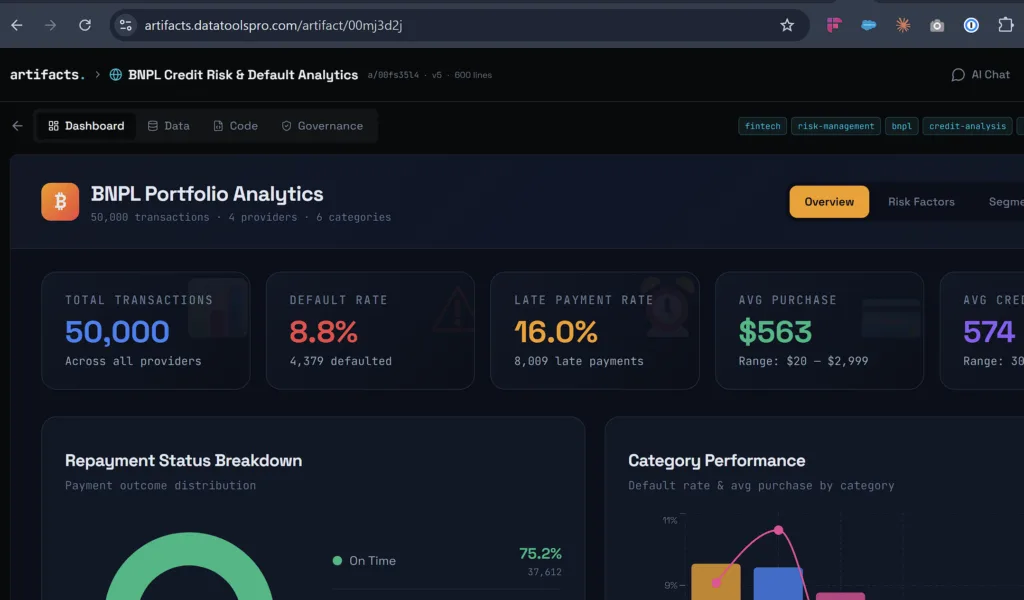
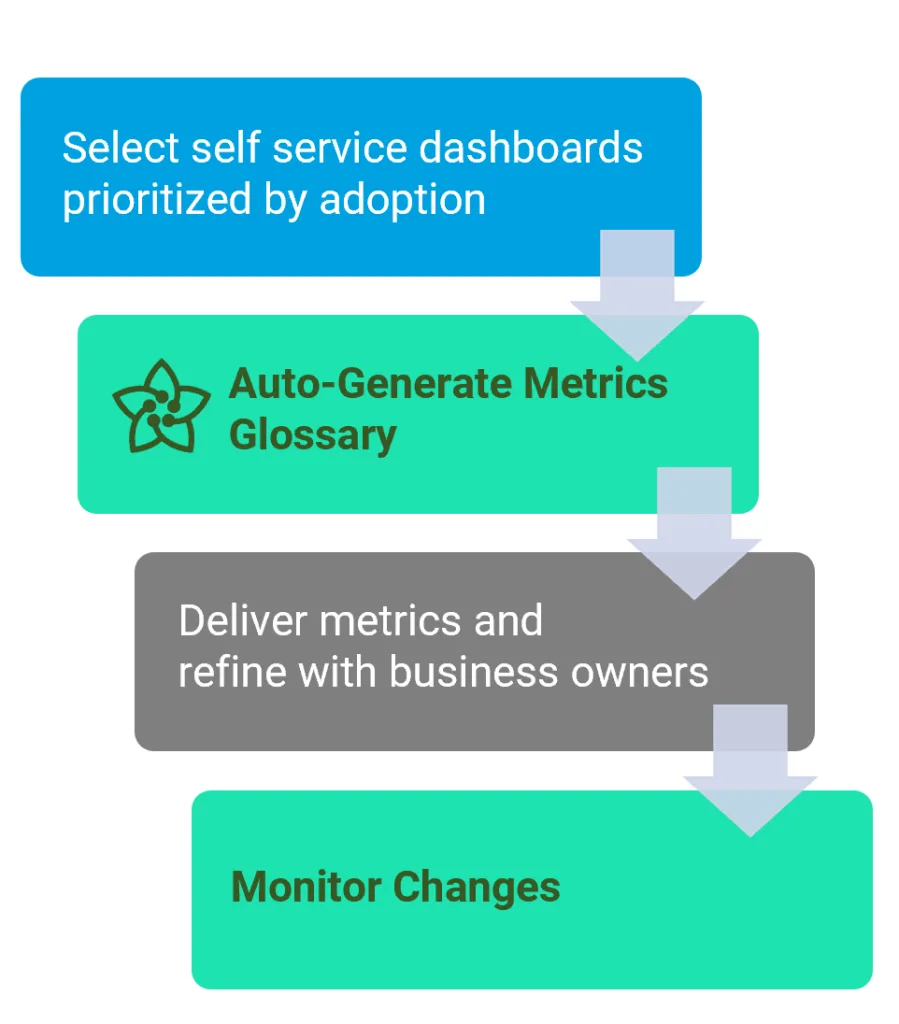
At DataTools Pro we still see the best results with AI when business semantics are clearly defined together. That includes taxonomies, business and statistical definitions and meta data that helps point to organizational and sometimes situational awareness. Our patent pending metrics analyst for example automatically scrapes BI and business applications to inference some of this context so we come to the table with recommendations, not blank templates waiting to be filled in.

Data-marts for Business Outcomes and Adoption

Traditional EDWs were built to answer a wide range of questions because the cost, complexity and time required it to be that way.. In 2026 your Snowflake warehouse can be up, running, and staged with data securely in days. Our approach to modeling data is fast, focused, and business topic oriented.

Data Platform and Delivery

Data volume, velocity, variety shape numerous architecture design decisions. Data acquisition, movement, and management come in many different flavors and price points.

Snowflake as our preferred data platform and preference, only when it is the right fit. Databricks, Microsoft Fabric, GCP are all viable and powerful options based:

  • Team, Skills, and Resource
  • Existing invesetments and maturity
  • Systems of record and platforms
  • Budget

DataTools Pro Delivery is Fast and Information Dense

The delivery model for AI / BI consultants is something we are always refining with clients. DataTools embraces agile principles and has continous releases, though release notes are weekly. Documentation is very dense and requires recipients to host version control (Confluence, Google Drive, OneDrive) where AI is available to recipients.

Version ControlAI Feature Required
NotionClaude
ConfluenceClaude
GitHub – REQUIREDNot required if other
Office 365 (we commit txt docs)365 Colipot
Google DriveGEmeni for Google Workspaces

Boring but important nuts and bolts: Technology tools and process are designed to keep things simple. You can design a data platform architecture that costs $6000 a year or $60,000 a year that fundamentally achieve the same result. We choose open source and embedded tools that can operate with Snowflake like GitHub and DBT Core.

  • Cost – Un-necessary cost reenforces the stigma that Snowflake is expensive. Like any consumption based technology, spend should yield results.
  • Adoption – If your Snowflake instance is running, we target 60% Snowflake spend on data movement and transformation to 40% direct delivery of reporting and analytics. AI development and consumption changes utilization and economics.. We are still observing results across clients before we make recommendations.
  • Security – Snowflake employs role based security and delivers a comprehensive network security function to help track and manage least level of privilege. Data tagging is front and center and can be used to apply masking policies.

Putting AI BI Together
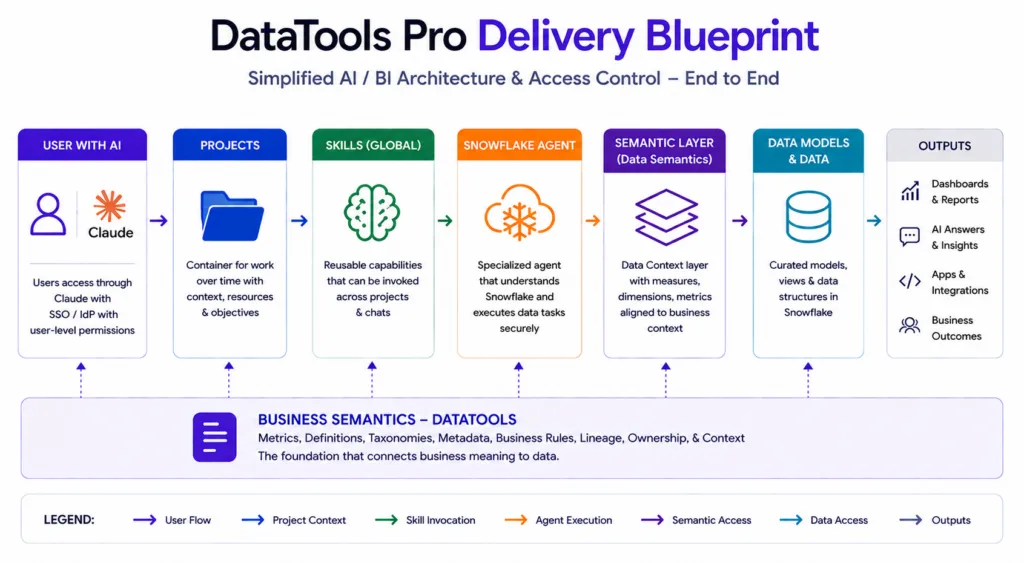
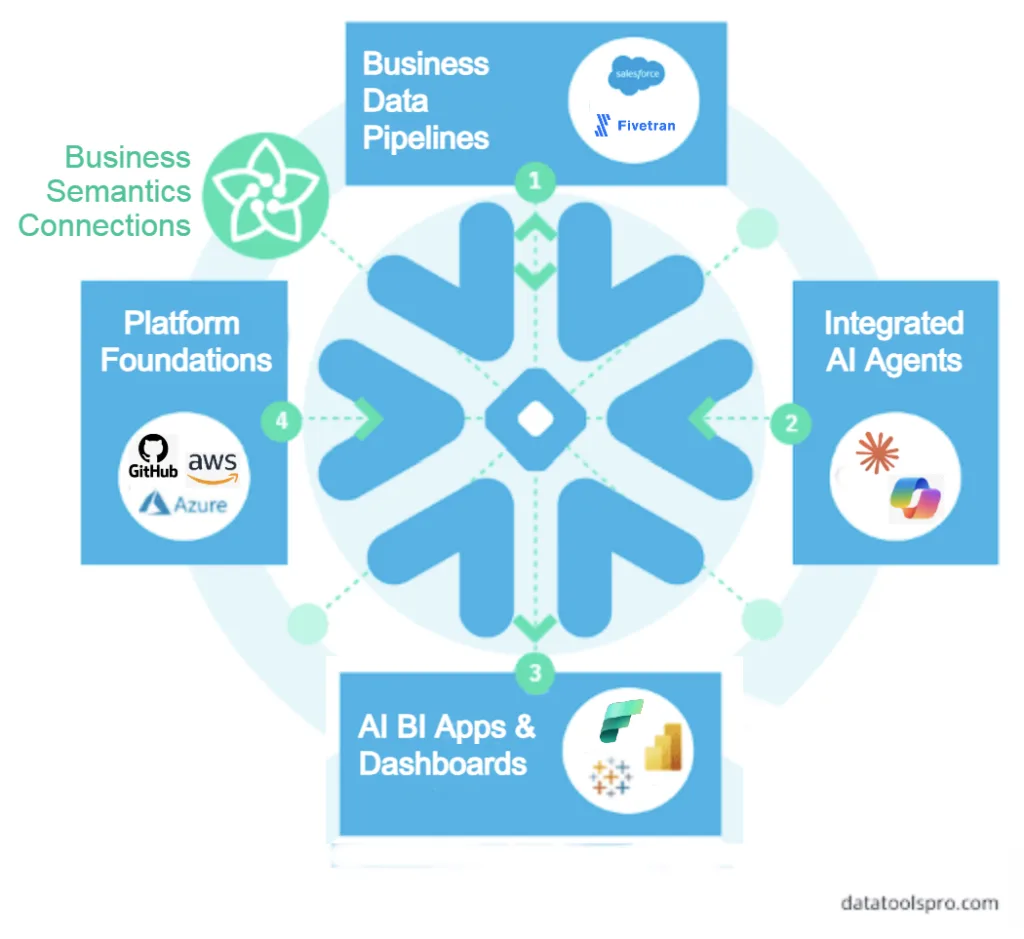
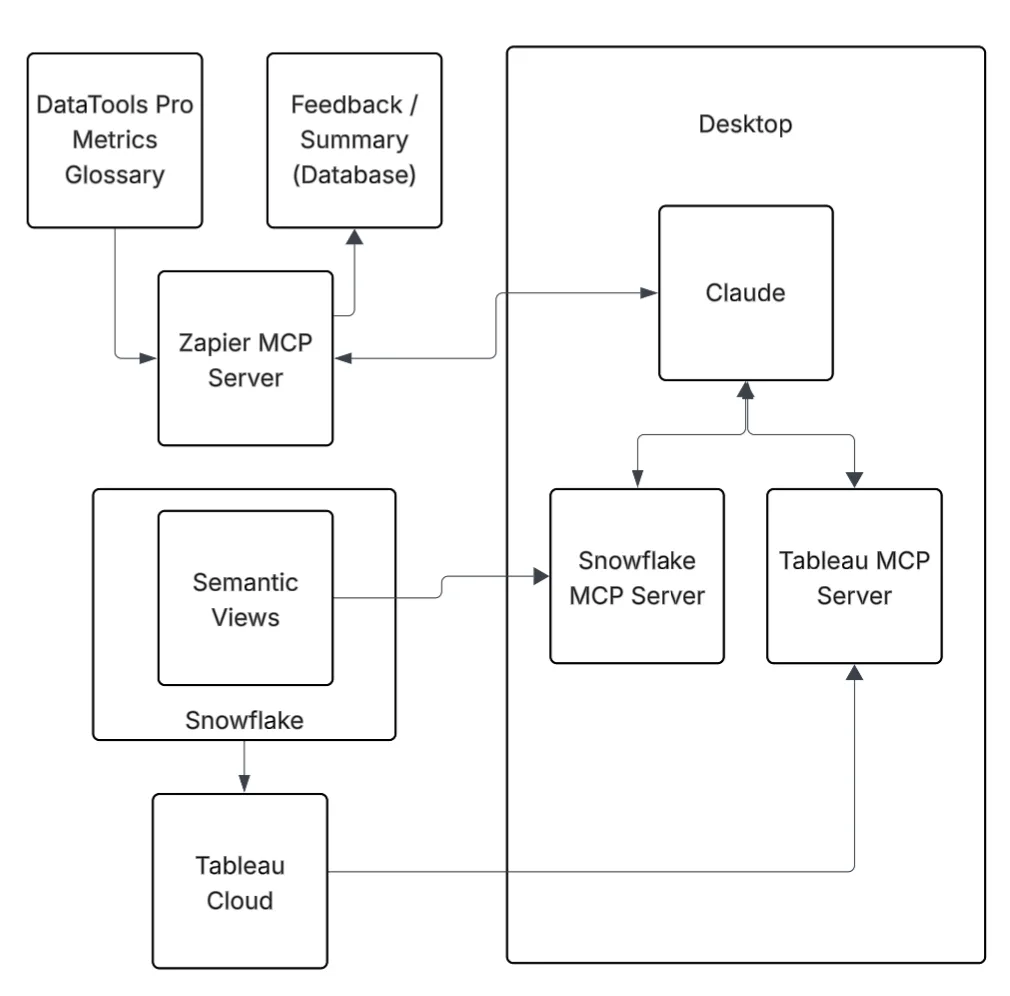
When you put the AI BI puzzle pieces together, this is one completed view of what a managed system looks like fro AI BI decision support. Contact us for a free consult
AI BI Concepts you Should Understand for Success

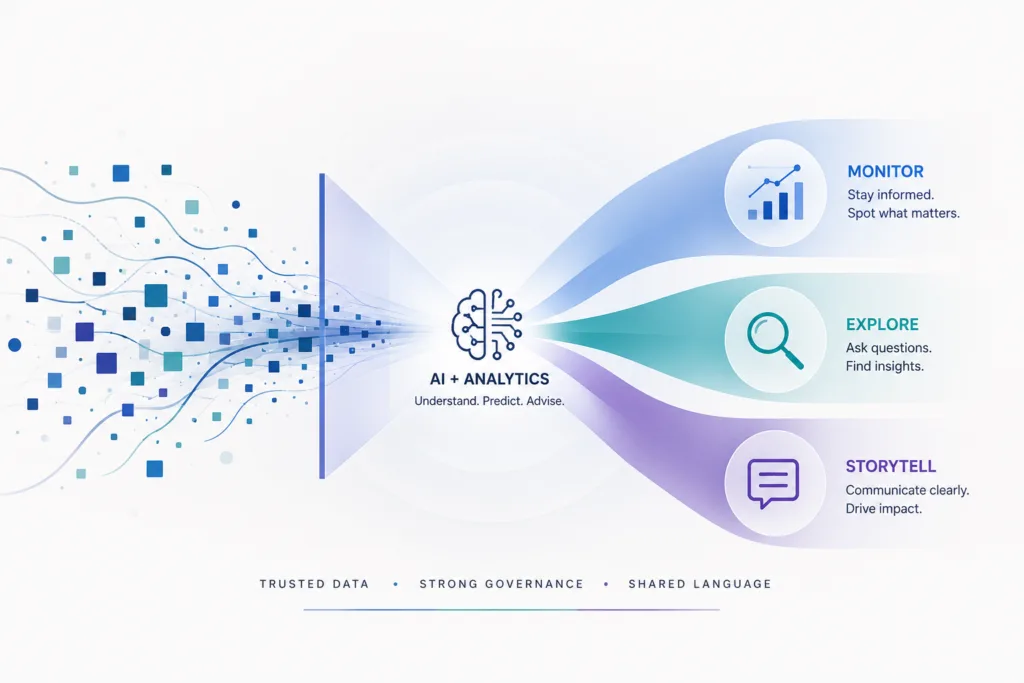
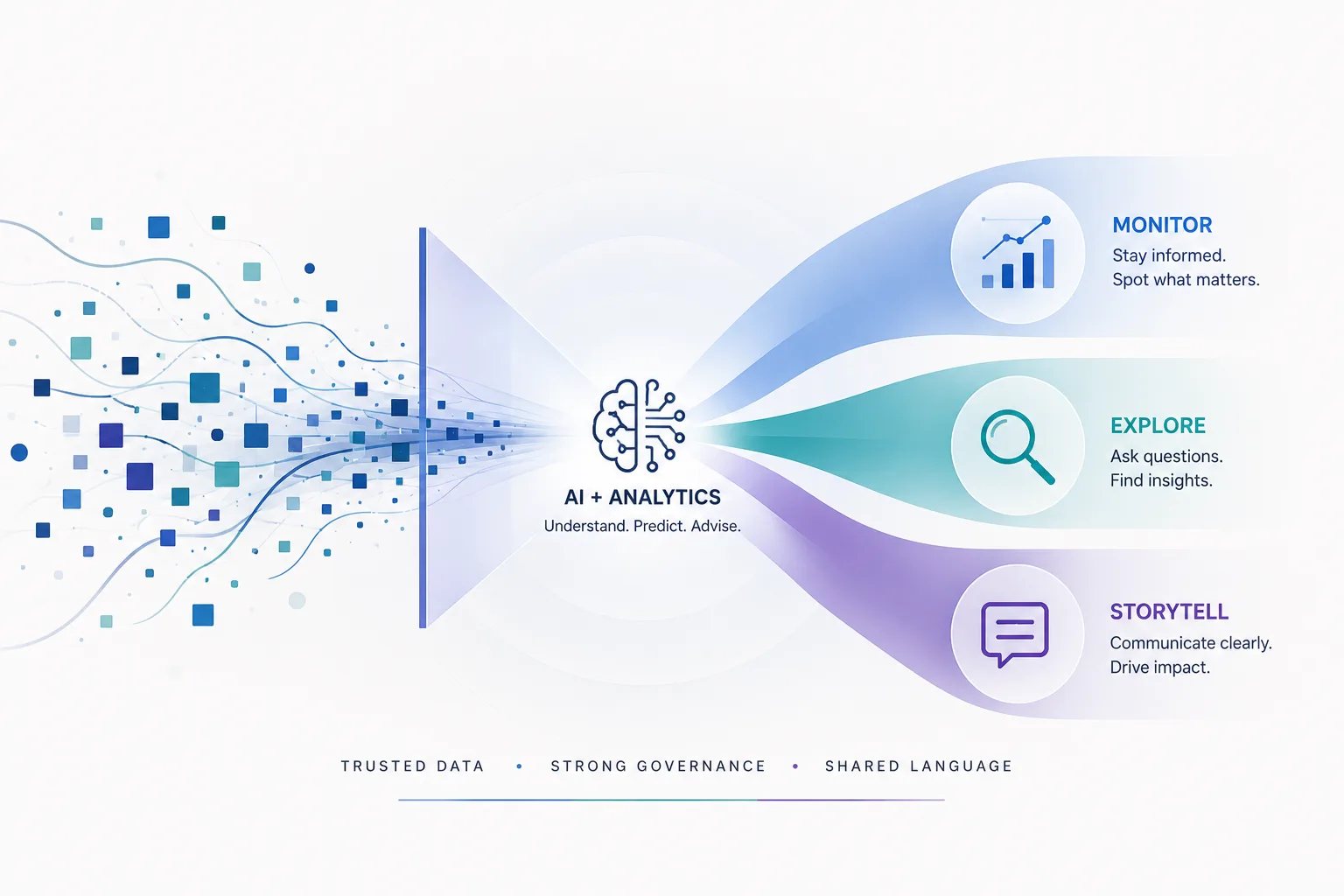
AI + Analytics infographic: central icon and flowing ribbons split into Monitor, Explore, Storytell with data stream on left and labels on right.

Business intelligence exits to support decisions and AI exists to replicate human intelligence through machine learning. AI BI magic happens when coupling the right people, prioritization, and processes around data, information management. AI + Analytics works, like any initiative when you have everyone on the team rowing in the same direction. This article was written to highlight some core concepts that help with alignment for AI BI initiatives.

AI BI

What BI Should Answer

Where are we? – Leading indicators (metrics and KPIs) summarize the current or previous state. These metrics and KPIs are calculated and summarized and mixed together based your the goals / objectives. These assets are designed for frequency and wide distribution. Dashboards for infrequent use by small numbers of users are reserved for executive and board-level users.

How did we get here? – Lagging indicators and trends over time and segments (dimensionality) help explain what is changing over time. The reality is trends and basic descriptive statistics explain “what” but not “why.”

Predict What “should happen next” – Basic statistical methods and machine learning algorithms have been paired with BI over the last 10 years.

What AI Should Answer?

What should we do to achieve our desired outcome? This has long been the promise of AI, long before ChatGPT: provide an objective, provide data and compute, and AI returns an answer. This is the domain where the competition to AI is gut, experience, and interpretation. Most data-driven organizations are still in the BI world, where data influences a human decision. Machine learning was reserved for high impact use cases because the cost, time, and expertise required made it so.

Last 15 Years = Data Driven AspirationNow = Agentic Data Driven Aspiration
human is the recipient of a data / analyticsAI agent is recipient of data / analytics
descriptive statistics or predictive score provides predictionsdescriptive statistics / predictive score provides predictions
reasoning, analysis, consensus occursAI reasoning interprets, iterates, recommendation are formulated
a decision is made and action occursAI or human decision and action occurs

AI models have evolved dramatically with the explosive adoption of LLMs. Industry analysts still report that most BI AI initiatives have a high failure rate. AI assisted analytics can be far more nuanced, so here is what you should look out for:

Why AI BI Initiatives Fail

  • Implementation of tech in search of a problem and problems without material impact
  • Lack of data governance, fidelity and as a result low trust
  • Mismatched expectations between “art of the possible” and reality organizational readiness
  • Knowledge management and metrics alignment

Nuanced Details that Matter for Planning AI BI

AI is going to touch every facet of how information is originated, delivered, and distributed inside an enterprise. Vendors like Databricks and Microsoft offer end-to-end platforms that facilitate the full BI and AI stack. Even the top AI companies in the world can’t solve your business / process challenges without consultants (they call them forward deployed engineers). No matter how well the tech tools are marketed, the devil’s in the details when you need to solving business problems with AI BI.

Deterministiv vs Probablis

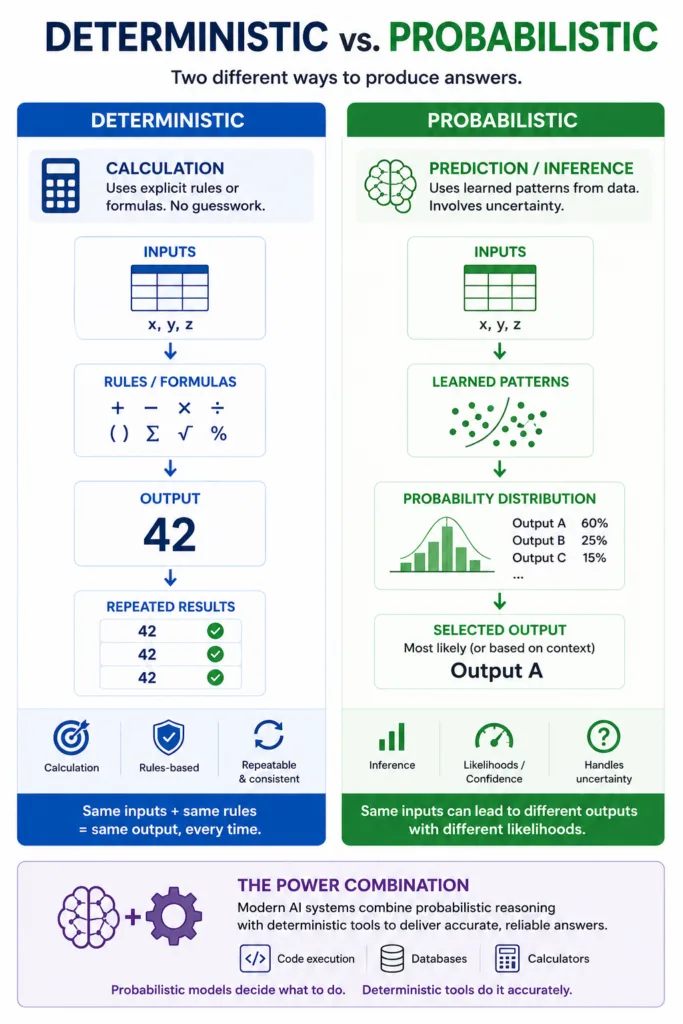
Deterministic vs Probabilistic

Deterministic: same inputs plus same rules equals the same output every time.

Probabilistic: predicts the most likely output based on learned patterns and uncertainty.

When LLMs first arrived, they were unreliable at math because they predicted answers from patterns rather than calculating them. Today, advances in reasoning, tool use, and code execution allow LLMs to offload calculations to deterministic systems, which has dramatically improved performance on math and statistics tasks. The model is still probabilistic, but it increasingly orchestrates deterministic tools beneath it.

This is where we see AI BI and the need for business and data semantics being critical.

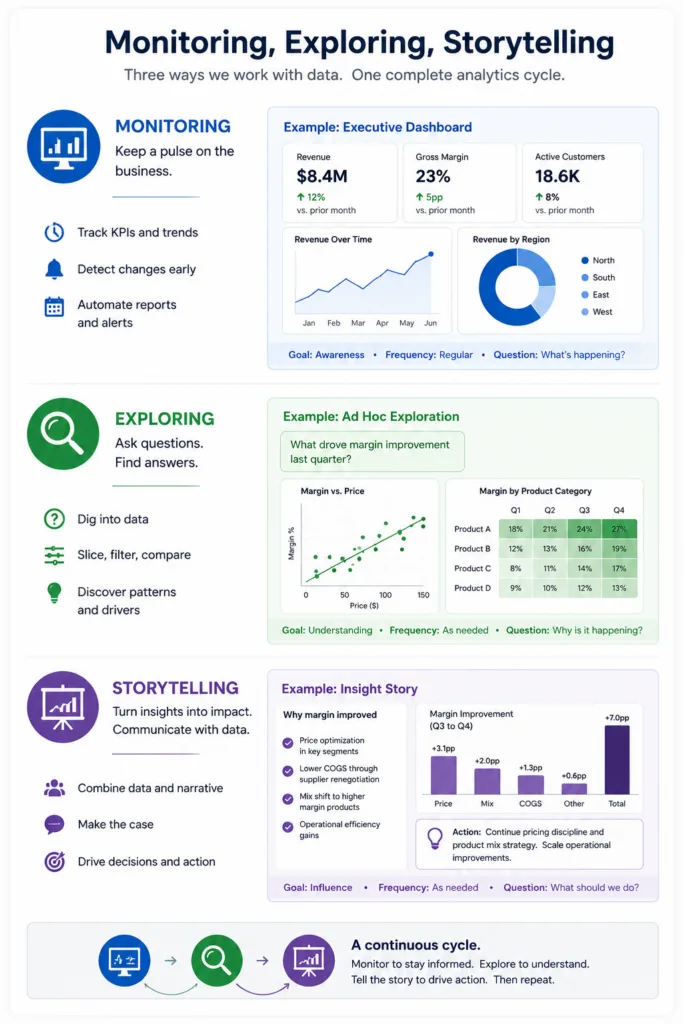
Monitoring, Exploring, Storytelling

Somewhere along the way, these three disciplines were blended into BI dashboards. With correct data and well-defined semantics, AI can be a very capable analyst for applying descriptive and predictive statistics across all three modes.

Monitoring is the dashboards, reports, and scheduled PowerPoints already circulating. AI is well-suited to producing these assets, and there is real innovation happening in this area across the AI BI landscape.

Exploring is where you ask questions business questions seeking answers using data. Excel is still the most widely used data exploration tool. Tableau is arguably second, unless you include Python and R. Exploration is also widely used for data wrangling tasks.

Storytelling is where disciplines overlap. Every PowerPoint is a curated story. The art and science of narrating a story with data is a special skill and AI quite effective at telling these stories.

Understand these 3 data presentation disciplines will help with tool selection because you need all 3.

Data Needs Meaning. Meaning Needs Context.

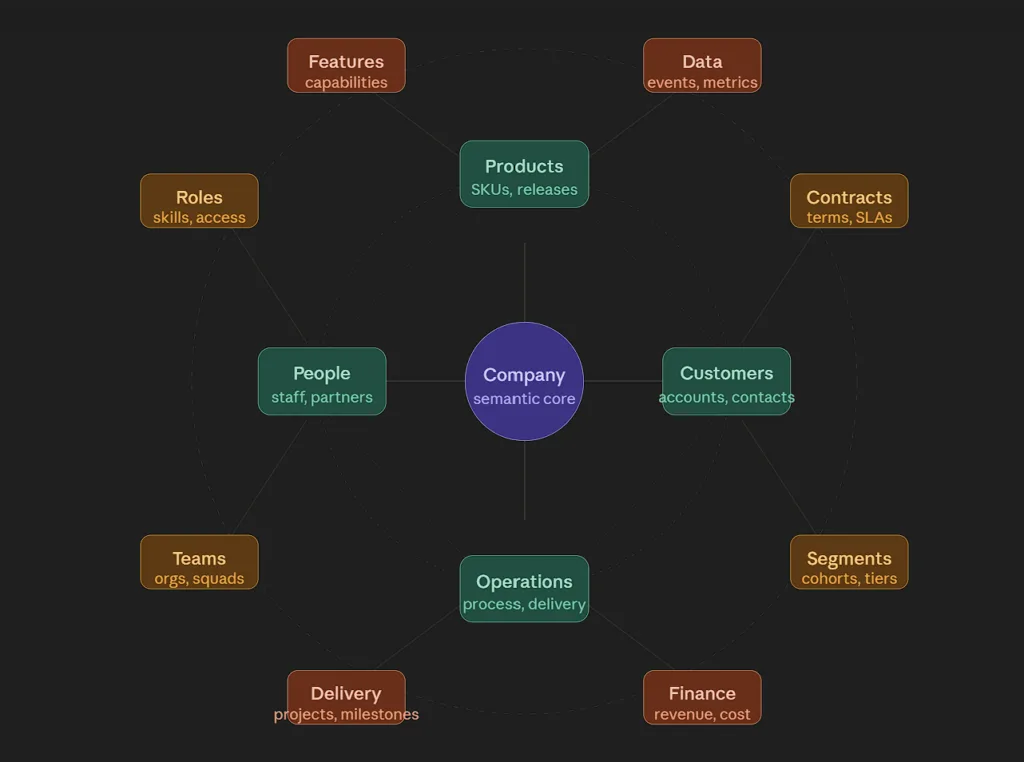
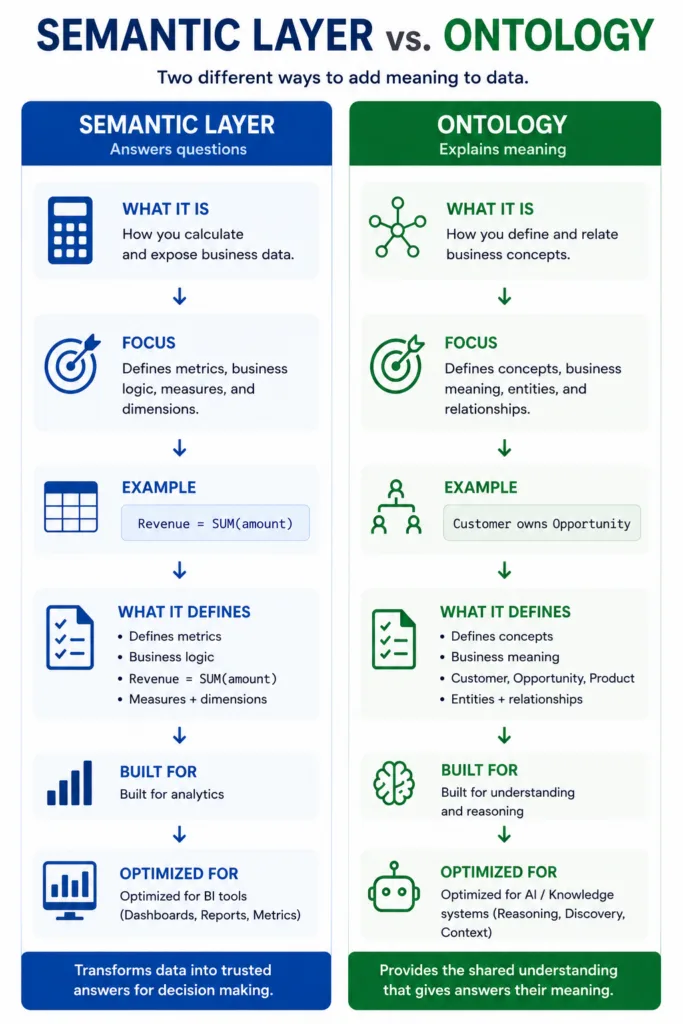
A semantic layer defines your metrics. Revenue = SUM(amount), every time, for everyone.

An ontology defines your business. Customer owns Opportunity. Opportunity belongs to a Segment. Segment drives Revenue.

BI tools need the first. AI agents need both.

As AI moves from predicting answers to orchestrating deterministic tools beneath them, the semantic layer becomes the calculation engine and the ontology becomes the reasoning and context map. Neither replaces the other. Together, they’re what separates governed AI analytics from a confident guess.

AI BI Governance

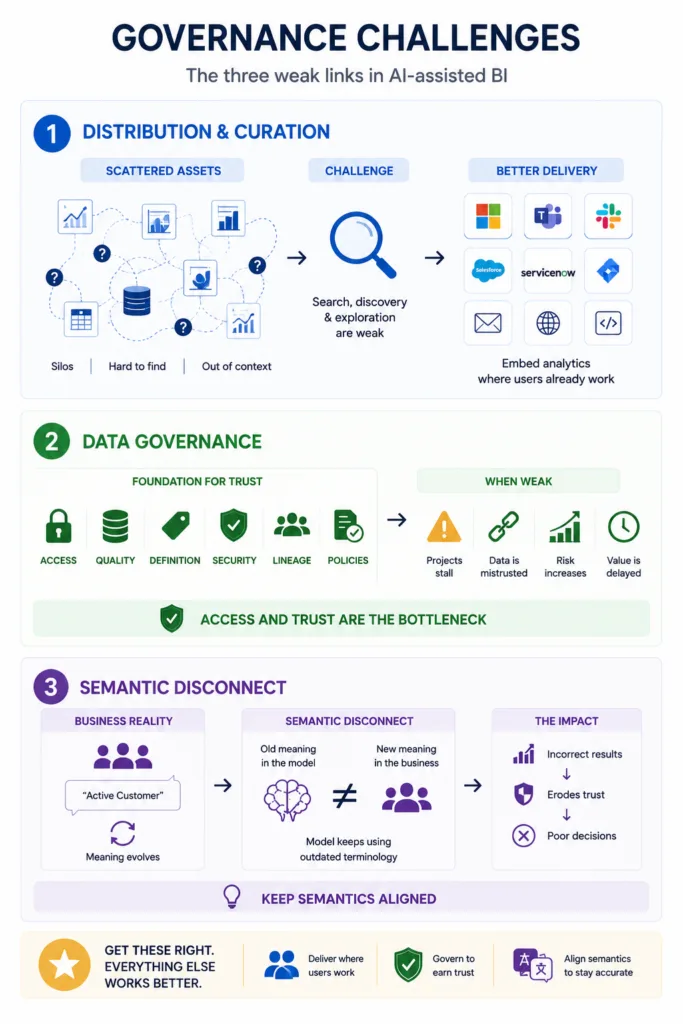
AI agents can generate insights, dashboards, and analytics artifacts faster than any business teams can digest them and technology teams can manage them. At 20-50 of anything, you reach an inflection point where managing them without structure becomes a new challenge and pain point.

  • Distribution and curation remains mostly unsolved. Search, discovery, and exploration of analytics assets has been a weak link in enterprise BI for a long time. Searching across chats, folders, repositories for the brilliant AI insight or artifact is causing enterprises a lot of pain. We are always hunting for better delivery experiences; for most clients, the answer is embedding analytics where users already work.
  • Data governance is the unglamorous but necessary structure that ensures AI initiatives can reach production with data that is correct, consistent, and appropriately scoped. A significant number of AI projects are stalling there. Access, trust, and security are are all bottlenecks.
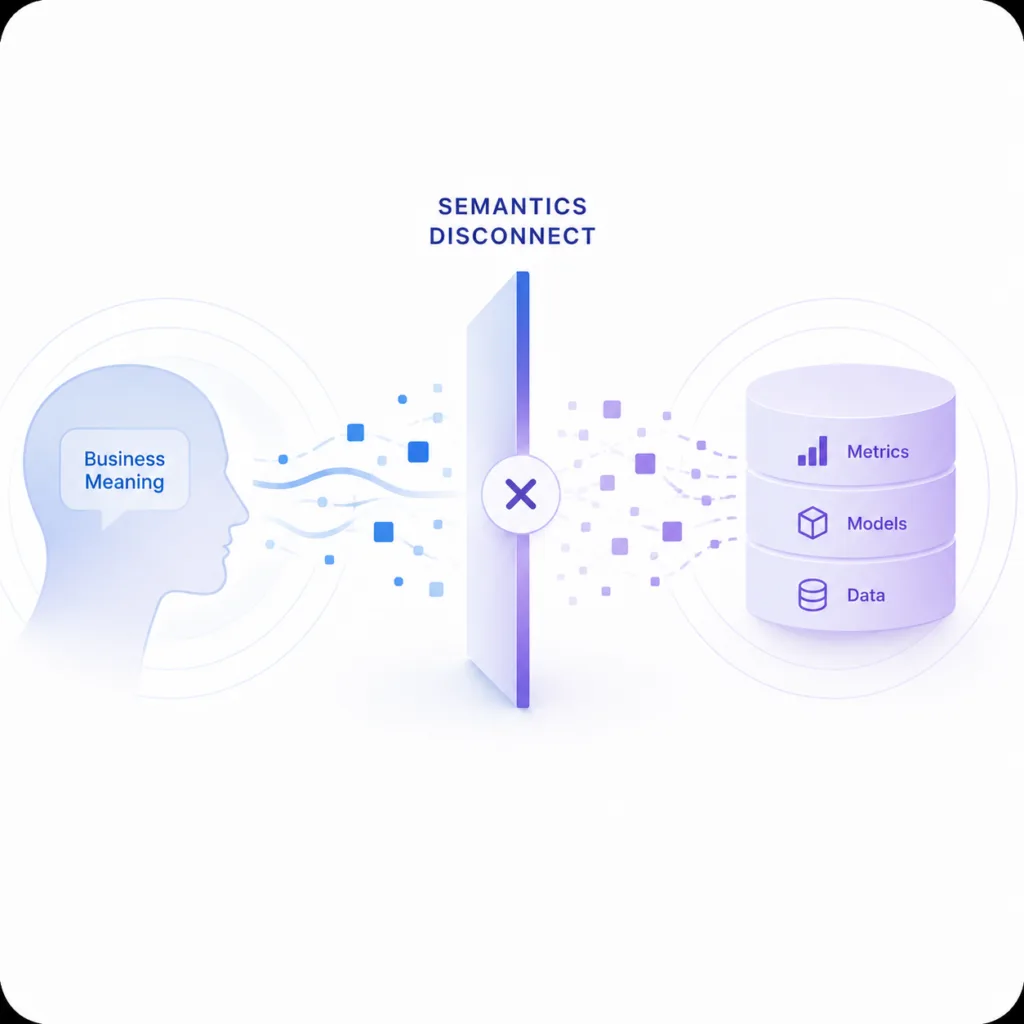
  • Semantic disconnect is the other failure mode rarely discussed and something we understand intimately. It’s our specialty and focus at DataTools Pro. LLMs can be gradually misdirected over time through inconsistent business terminology. Those misdirected signals produce incorrect results that poison your results. Incorrect results erode trust. Data can be perfect and the semantic layer can be well-executed; the breakdown happens when business semantics shift and the model does not keep pace.
    Learn more AI BI Challenges

What does succesful AI BI look like?

Organizations that succeed with both BI and AI are are managing with some form of governance. Knowing what your data means, who owns it, and whether it can be trusted, and what AI vendors are doing with it is critical. Feel free to check out some of our recent learnings and solutions for AI BI or Contact Us so we can learn about your AI BI initiative.

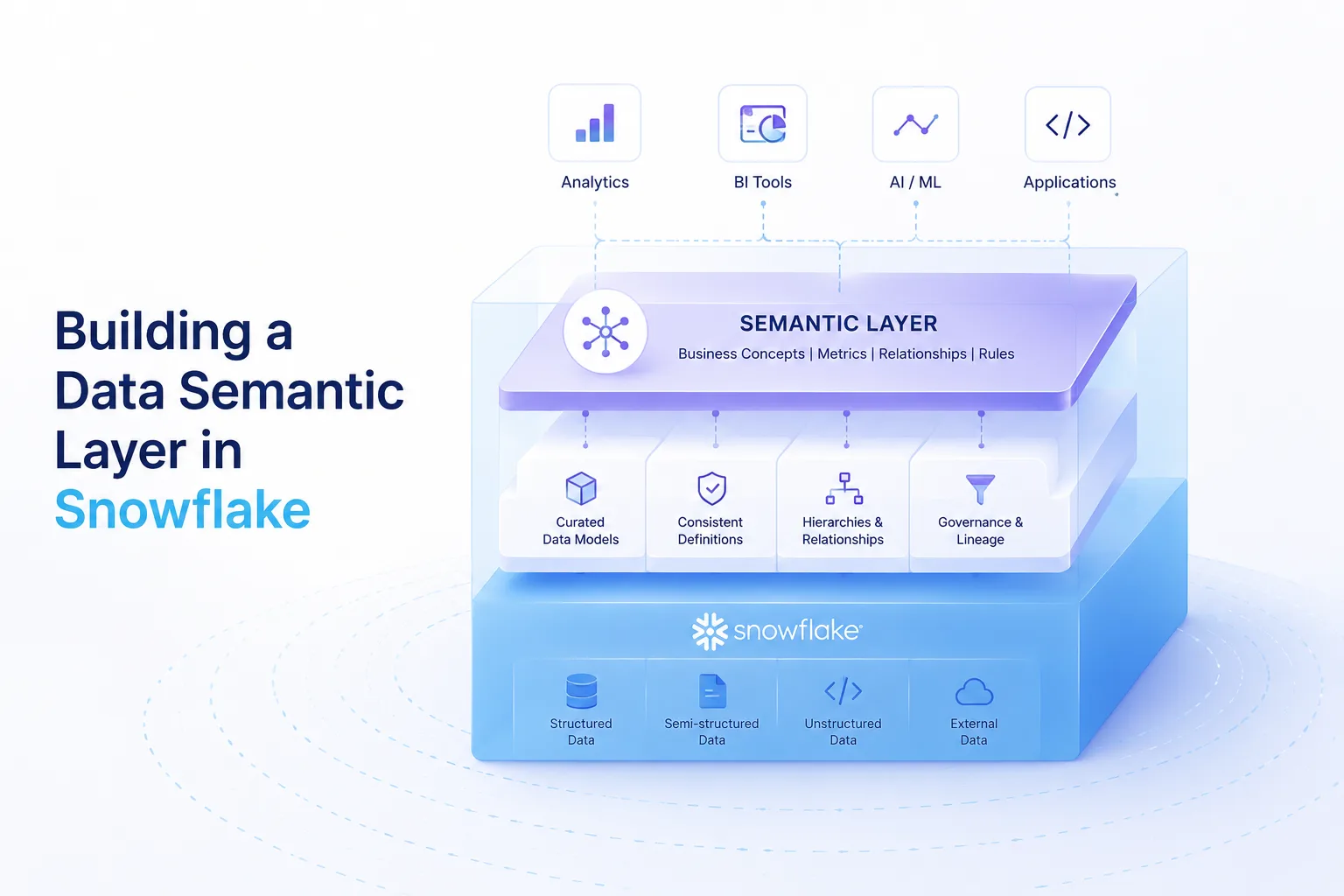
Building a Snowflake Semantic Layer in in 2026

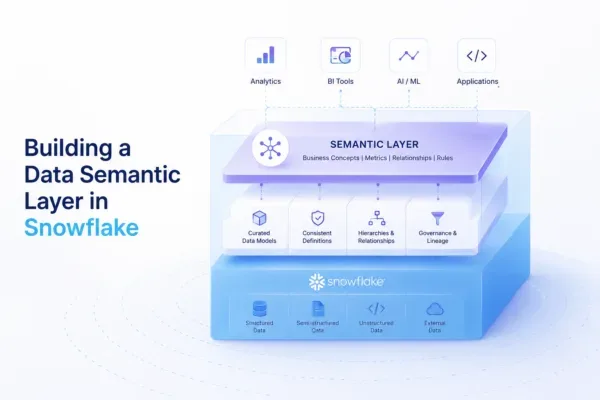
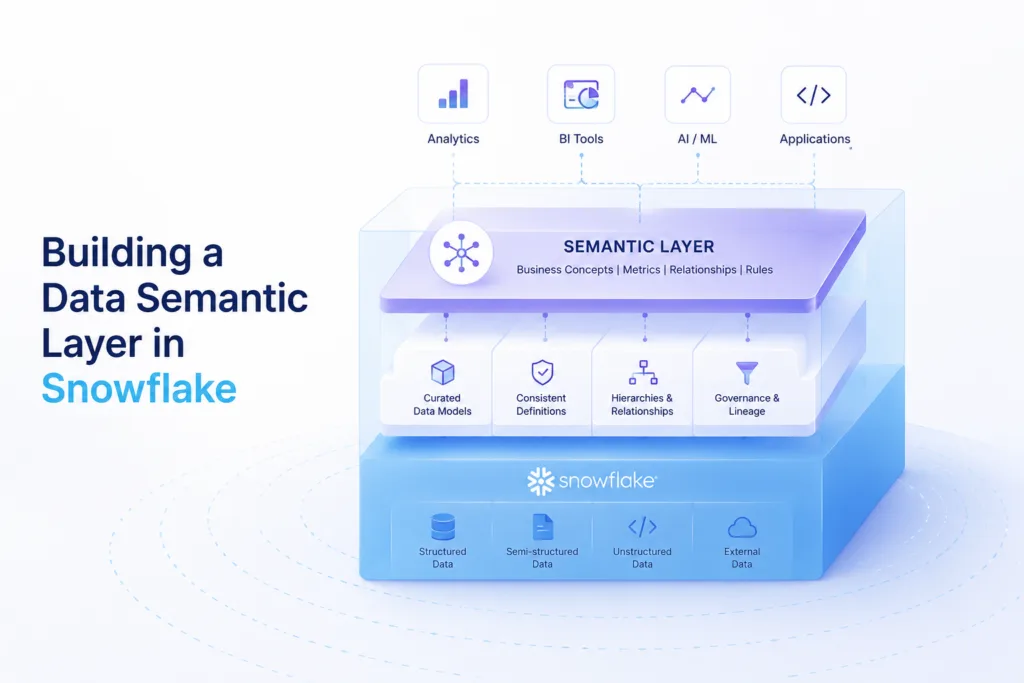
Diagram of Snowflake Semantic Layer architecture with icons for Analytics, BI Tools, AI/ML, and Applications above a layered platform labeled 'Semantic Layer' and 'Snowflake' logo on the base (informational image).

Snowflake built its roots and reputation as a power data warehouse. Working with large sums of structured data and semi structured data is a breeze in Snowflake. With the push toward AI BI, constructing Snowflake semantic layer makes sense, if you have the right process and governance structure in place.

LLMs and advancements in AI have shifted who and how data turns into actional information within a typical enterpise. Data storytelling, data exploration, and using descriptive statistics is in the hands of anyone with access to Claude. In fact our opinion is Claude has reached a level up to par with professional analysts and data scientists.

Semantics Originate with BI: Building Snowflake Semantic Views

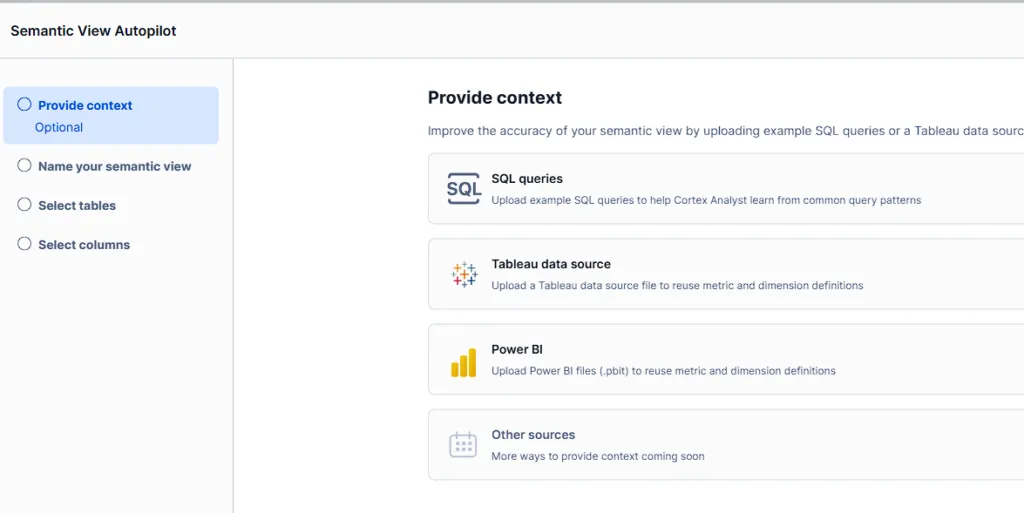
No company is starting their semantic layer discovery and execution with a blank canvas. Tableau and Power BI operate more than a quarter of the entire Business Intelligence landscape. Business and data semantics converge within your BI platform, so it only makes sense to inherit metrics, filters and other critical inputs that truly define the last mile of business understanding. A semantic layer built purely on top of a database with no context to business delivery more likely to fail when it reaches AI / BI tools that ultimately consume data. Snowflake natively consumes published data and table relationships.

Snowflake Semantic Layer AI BI Import

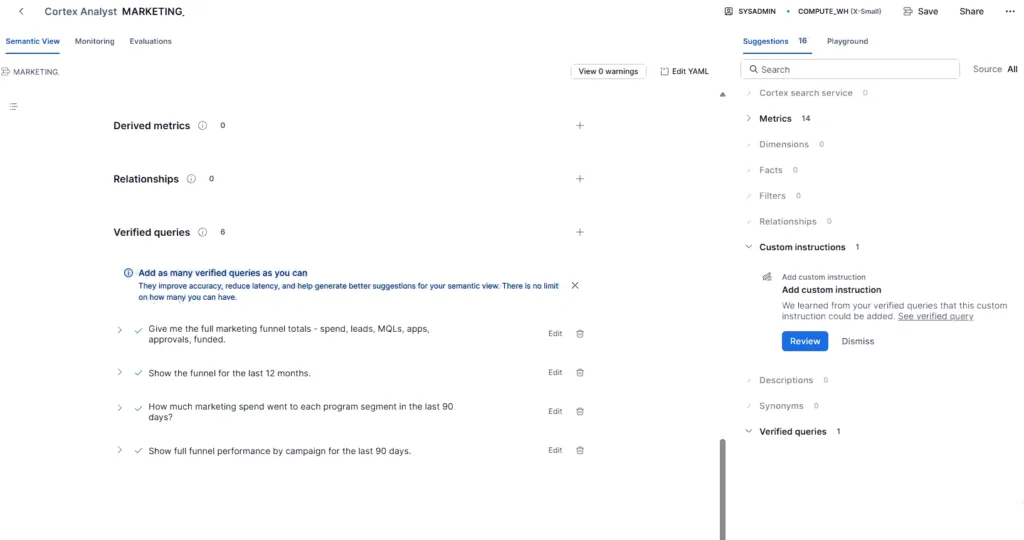
Refining a Semantic Layer with Analyst –

This is the stage where you get out what you put in… Rarely if ever does the data warehouse, semantic layer, and labeling of BI reports / dashboards align. This is your opportunity to course correct and set yourself up for success, if you are using AI to either build BI assets or use AI directly to analyze your data.

Recommendations

  • Teams that treat the semantic layer as a database labeling exercise are setup to fail.
  • Do not connect AI directly to Snowflake semantic layers without validating existing BI use cases and results
  • Engage BI builders and analysts with domain expertise to test, validate and lend data context.
  • Do not blindly use “AI” to inference meaning and definitions if you do not know them.

This phase is where subject matter expertise is just as important as technical competency. Snowflake has taken the correct route to align queries to business questions. Rather than looking at code and meta data and and making up questions, Snowflake will at least scan real queries executed before it makes up questions. Most of them are basic, and that is by design.

The difference between a functional agent and a truly useful agent conceptually is the depth and richness of your semantic layer.

Verified Queries and Log Monitoring

When you build business intelligence, you have something to ground yourself during data validation and user acceptance testing. Snowflake has taken the correct route to align queries to business questions. Rather than looking at code and making up questions, Snowflake will scan your query history.

Inferencing Semantic Views Risky

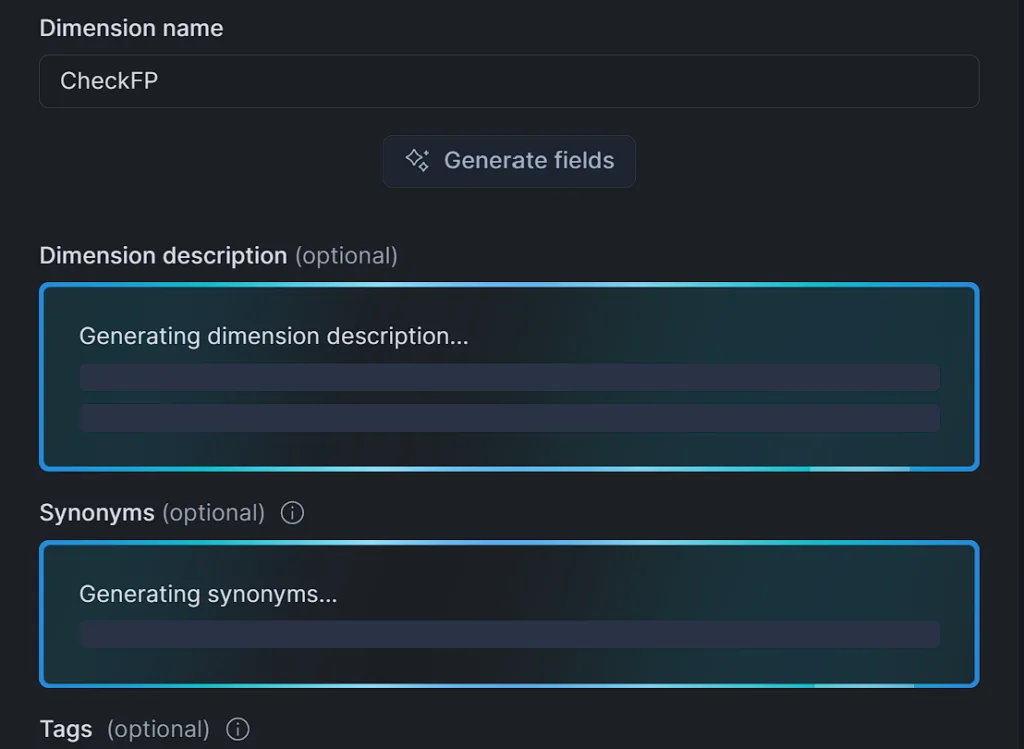
Inference based semantics feels magical as a creator to establish depth and meaning behind your data. The idea of having “something is better than nothing” does not play out when it’s time for asking questions of your data. That can turn to semantic disconnects in your organization when AI observed meaning does not translate to business alignment and understanding. This is one of the AI / BI risks that we highlight and often cross train SMEs and analysts to get involved while building and administrating Snowflake semantic layers.

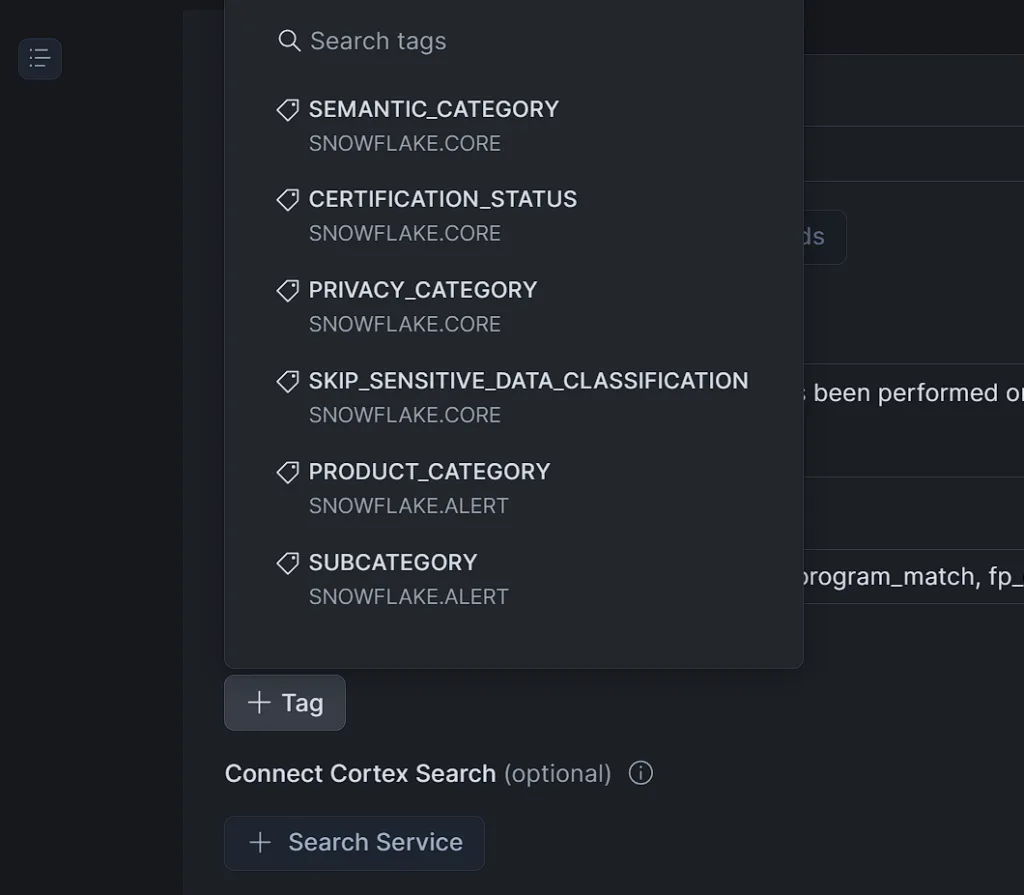
Adding depth with Tags

One of our original gripes with the Snowflake semantic layer was the lack of depth in meta data, which directly conflicts with the patterns we have found most successful with AI to remove ambiguity and deliver contextual depth needed to accurately translate business questions to the right metrics and attributes. Building one semantic view for a single topic makes for a great demo. When you have hundreds of marts across 5 lines of business, you need tags for reconciling semantic disconnects.

Activating your Snowflake Semantic Layer with AI

Once you have your Semantic layer built, you can connect directly from your BI platform, build Snowflake agents, or connect Claude to Snowflake directly. The benefit is the layer of context to help convert plain English questions to the underlying queries. This is where Snowflake’s “verified” queries and monitoring capabilities make a huge leap over direct AI to SQL and legacy BI reporting and dashboard semantic layers. We are working on formal eval results to highlight the lift in applying Snowflake Semantic layer and Snowflake Agents as an interface.

3 Tips for Planning your Snowflake Semantic Layer

  1. Snowflake Cortex Analyst is a an amazing feature. The architecture is sound and the direction is right. But the difference between a functional agent and a truly useful one is not the platform and tools. It is the depth and richness of the semantic layer behind it.
  2. Semantics do not originate in a database. They originate in the BI tools your business has relied on for years. Inheriting that context, validating it against real query history, and extending it with tags and analyst input is not optional work. It is the most important work to build production grade semantic models.
  3. The teams that treat this as a labeling exercise will get labeling results. The teams that bring domain expertise, validate against existing BI, and close the gap between database definitions and business understanding will build something truly useful.

Understanding Common AI BI Challenges that Slow Adoption

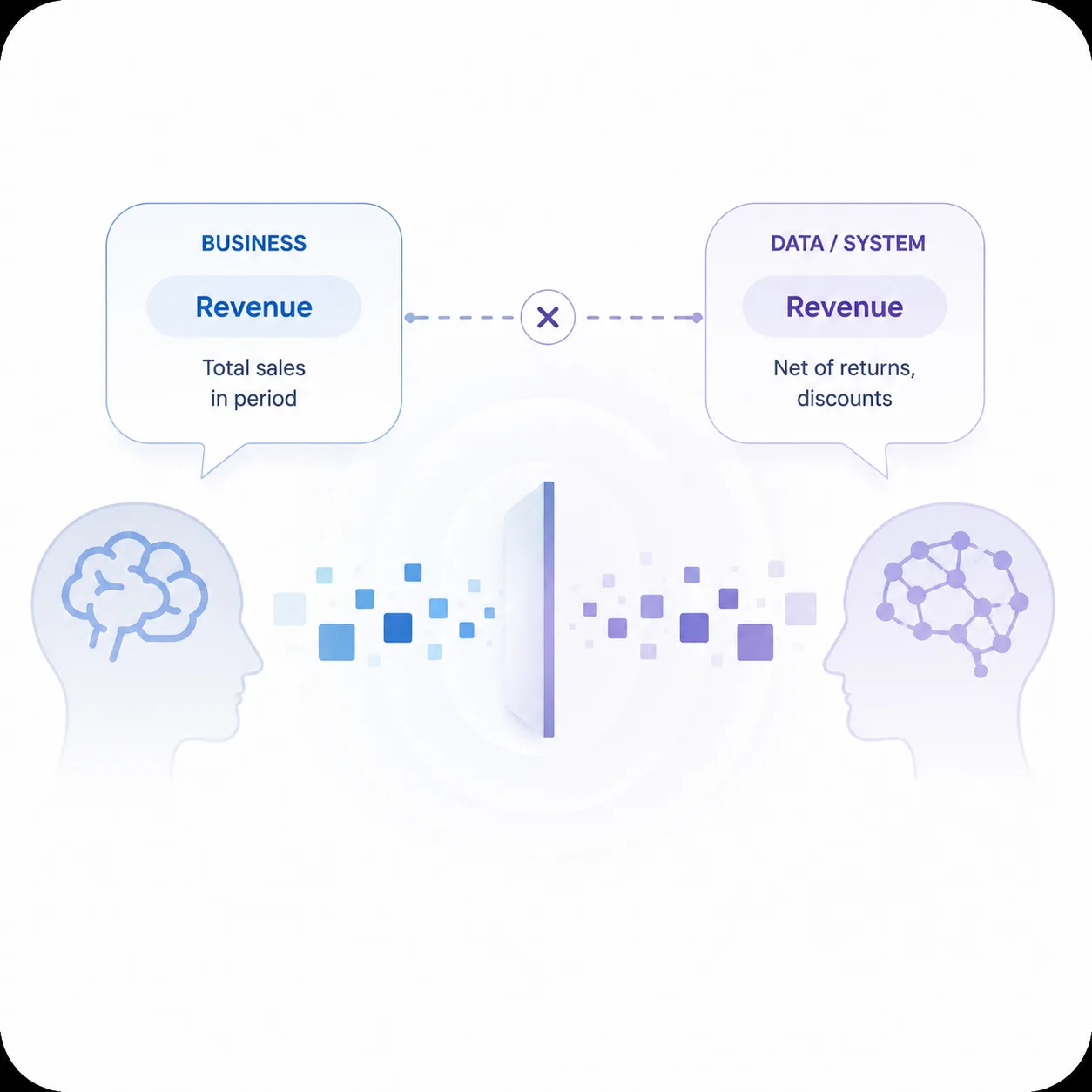
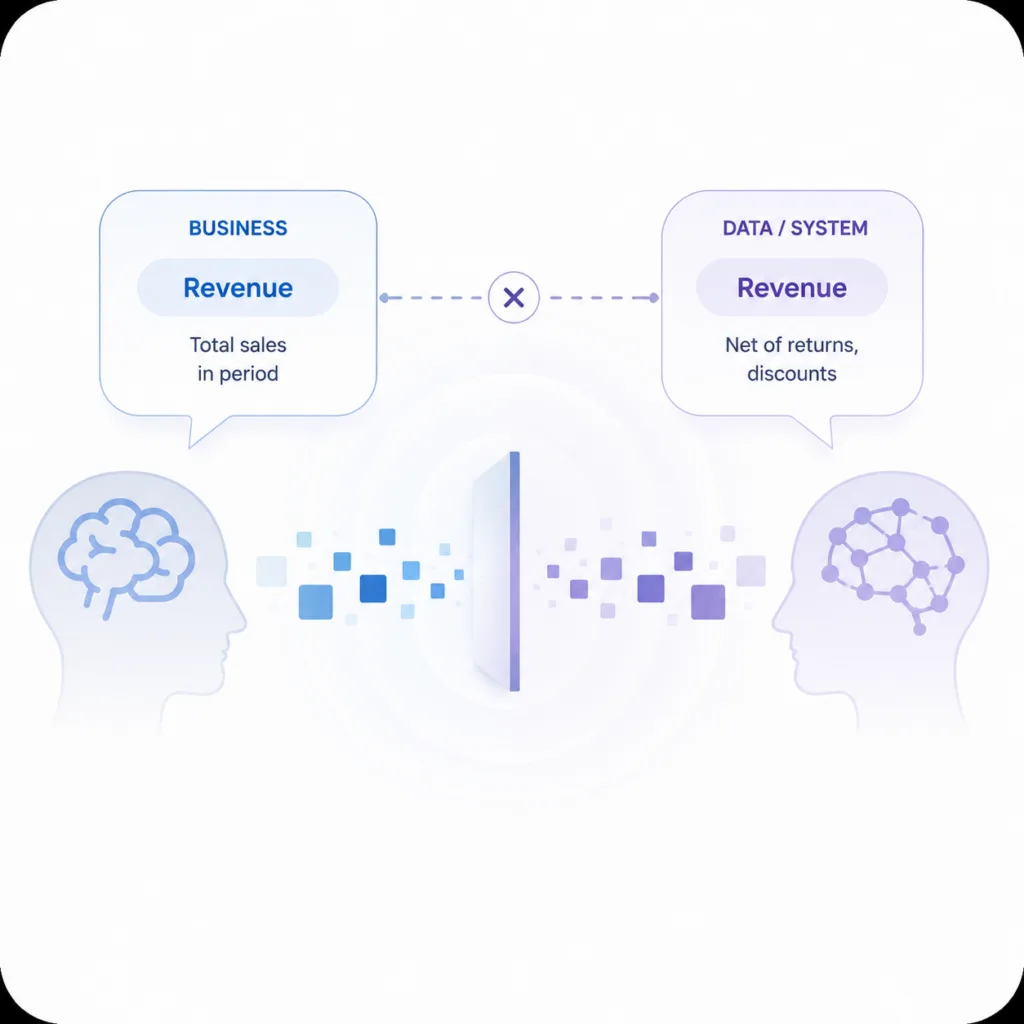
AI BI Challenges - Illustration of two profiles facing each other with a central data exchange, labeled Revenue in Business and Revenue in Data/System, symbolizing data flow.

We have 3 years of success and failure delivering LLMs on the back of 20+ years of delivering analytics. Our team is very bullish on AI because it’s grounded on years of success, but that comes with real AI BI Challenges. Understanding your organization’s dynamics are important to avoid them.

AI BI Challenges - Illustration of two profiles facing each other with a central data exchange, labeled Revenue in Business and Revenue in Data/System, symbolizing data flow.

Enterprise dynamics that can impact your AI BI success

Uniqueness

LLMs are trained on a corpus of knowledge that is wide reaching. For example, an LLM understands all facets of a general retail store operation. However, it does not understand your inventory and supply chain management, and customer buying patterns. These are nuanced problems that have required some form of AI. Your business is unique… Maybe it’s part of your secret sauce to success or maybe your uniqueness is holding you back. Like the team members that manage your business, AI requires direction from anything that breaks for “norms.”

Ambiguity

Ambiguity causes human confusion requiring “alignment.” We call bad output from an LLM a hallucination which ambiguity can easily trigger. In the workplace, tribal knowledge typically reduces ambiguity and fills in gaps. To be in the business of controlling the quality of AI / BI is removing ambiguity from data driven decisions. A process that is well defined documented and followed is easy to explain to people and a system. The “gray” area or human reasoned connections are both an incredible use case for using AI reasoning models but a very painful way to experience AI aided decision support. Data influenced decisions should be clear and consistent to be trust worthy.

Business Semantics Disconnect

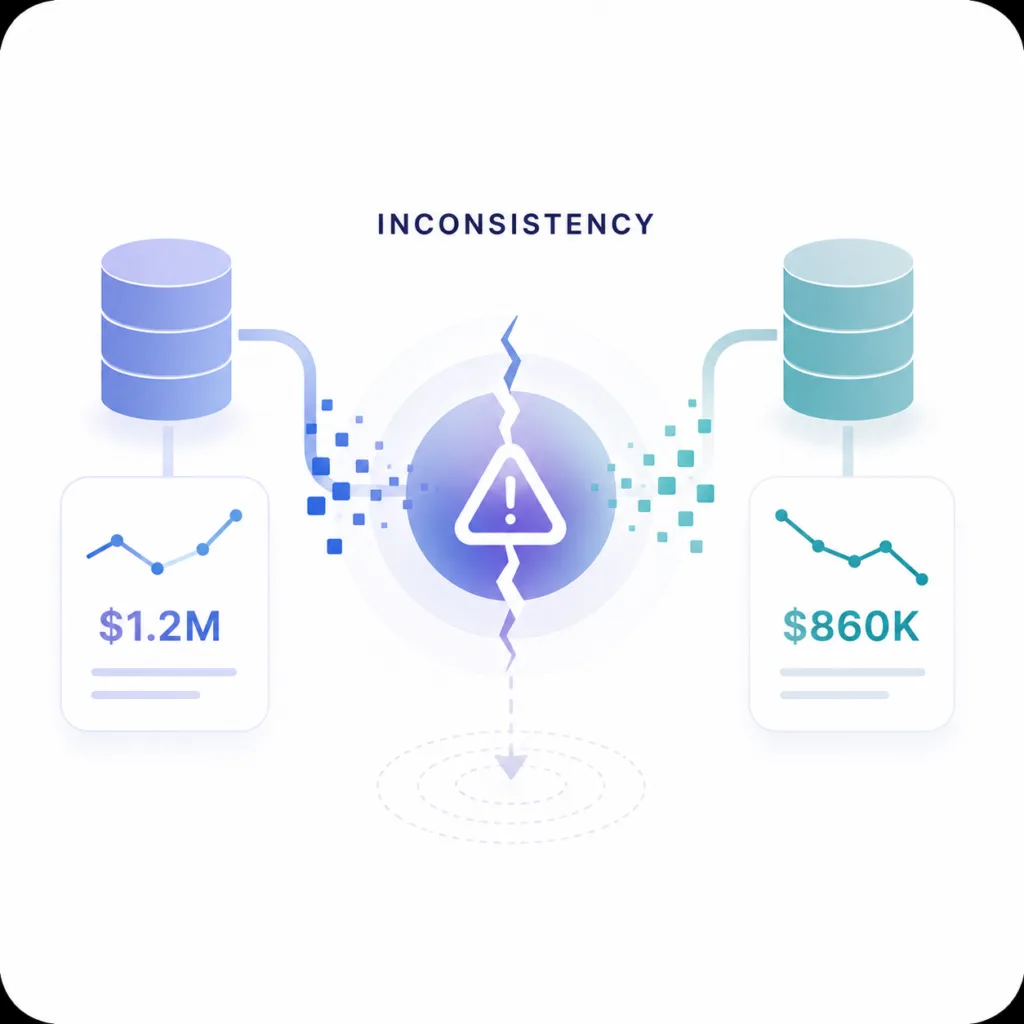
Two team members show up to a meeting with 2 versions of revenue… This problem is painful, but often overblown to sell software and services. We understanding how decisions happen, semantics break down, and how to design systems that surface these disconnects early and often. All paths lead back to “governance” of some form, but we believe governing your semantics is just as important as the data itself!

Inconsistency

Consistency over time wins. This is especially true when your enterprise does not operate at high data volumes. A process that is well defined, documented, and followed is easy to explain to people and to a system. The gray areas and human-reasoned connections are both a powerful use case for AI reasoning and a painful way to experience AI-aided decision support. Data-influenced decisions need to be clear and consistent to be trustworthy.

Want to avoid AI BI challenges?

The businesses that win are not the ones with the most data or the most tokens burned on AI services . They are the ones who understand how to focus their teams on the right problems, AI BI concepts, and make consistent improvement to effectively use data for continuous improvement. DataTools Pro is here to help!

Adventures with Snowflake MCP and Semantic Views

Snowflake MCP and Claude

Last month, I had an opportunity to roll up my sleeves and start building analytics with Snowflake MCP and Snowflake Semantic Views. I wanted to see how far I could push real-world analyst and quality assurance scenarios with Tableau MCP and DataTools Pro MCP integration. The results gave me a glimpse of the future of AI/BI with real, production data. My objective was to deliver a correct, viable analysis that otherwise would have been delivered via Tableau.

The time spent on modeling my data, providing crystal clear semantics, and using data with 0 ambiguity helps. My results delivered great results, but I ended the lab with serious concerns over governance, trust, and quality assurance layers. This article highlights my findings and links to step-by-step tutorials.

Snowflake MCP and Claude

Connecting Claude, Snowflake MCP, and Semantic Views

The first step to connect all of the components was building my Snowflake Semantic views. Snowflake MCP gave me the framework to orchestrate queries and interactions, and using Snowflake Semantic Views gave me the lens to apply meaning. All of my work and experimentation occurred in Claude. This gave me the AI horsepower to analyze and summarize insights. To connect Snowflake to Claude, I used the official Snowflake MCP Server, which is installed on my desktop and configured in Claude.

Together, these tools created a working environment where I could ask questions, validate results, and build confidence in the answers I got back.


Creating Snowflake Semantic Views

With my Snowflake Semantic View setup, I spent some time researching and reading other folks’ experiences on semantic views. I highly recommend having a validated and tested Semantic view before embarking on AI labs. If you don’t know what metadata to enter into your Semantic View, seek additional advice from subject matter experts. AI can fill in blanks, but it shouldn’t be trusted to invent meaning without human oversight: Why AI-Generated Meta-Data in Snowflake Semantic Views Can Be Dangerous

Bottom line… Begin with a simple and concise Snowflake semantic model. Build clearly defined dimensions and measures. Use real-world aliases and refrain from using AI to fill in the blanks, unless your objective. Layer on complexity once you’re comfortable with the results.


What Worked Well

  • Control over data access
    Thankfully, the Snowflake MCP is limited to semantic views and Cortex search. The opportunity and value of Cortex search cannot be understated. I will cover that in another post. The idea of unleashing an AI agent with elevated permissions to write SQL on your entire data warehouse is a governance nightmare. Semantic Views gave me the ability to scope exactly what Claude could see and query.
  • Accuracy of results
    The top questions I get during AI labs: “Is this information correct?” I had a validated Tableau dashboard on my other monitor to validate the correctness of every answer.
  • Simple to complex questioning
    My recommendation with any LLM-powered tool is to start with high-level aggregate questions. Use these to build a shared understanding and confidence. Then, grounded on validated facts, you can drill down into more detailed questions with confidence. This approach kept me in control when the analysis moved beyond existing knowledge and available analysis.

Where I Got Stuck

Three challenges slowed me down:

  1. Metadata gaps – When the semantic layer lacked clarity, Claude produced ambiguous answers. It isn’t garbage in, garbage out problem…. It is me having a level of subject matter expertise that was not captured in my semantic layer or in a feedback loop to make the AI system smarter. LLM analysts feel less magical when you know the answers. That is where adding Tableau MCP allowed a pseudo peer review to occur.
  2. Over-scoping – When I got greedy and exposed too many columns, ambiguity crept in. AI responses became less focused and harder to trust. Narrower scope = better accuracy.
  3. Context Limits– I had Claude do a deep analysis dive. I also had it code a custom funnel dashboard that perfectly rendered a visual funnel with correct data. At some point, Claude explained that my context limit had been reached. My analysis hit a brick wall, and I had to start over. Claude is a general-purpose AI chatbot, but it was still disappointing to hit a stride and have to stop working.

Risks You Should Know

If you’re using AI to build your semantic layer, you need to be aware of the risks:

  • AI-generated semantics can distort meaning. It’s tempting to let an LLM fill in definitions, but without context, you’re embedding bad assumptions directly into your semantic layer: Why AI-Generated Meta-Data in Snowflake Semantic Views Can Be Dangerous
  • Do not give LLMs PII or Sensitive PII. As a rule of thumb, I do not add PII or sensitive PII into semantic models. I hope that at some point we can employ Snowflake aggregation rules or masking rules.
  • Governance blind spots. Connecting the Snowflake MCP requires access from your desktop. For governance, we use a personal access token for that specific Snowflake user’s account. That ensures all requests are auditable. Beyond a single user on a desktop, it’s unclear how to safely scale the MCP.
  • False confidence. Good syntax doesn’t equal good semantics. Always validate the answers against known results before you scale usage.

Final Take

Snowflake MCP and Semantic Views are still very much experimental features. They provide a glimpse of what will be possible when the barrier and access to governed, semantically correct data are removed.

In my case, I employed DataTools Pro for deeper metric glossary semantics and a writeback step via Zapier to capture learnings, re-directions, and insights for auditing purposes. If you would like assistance setting up a lab for testing, feel free to contact us to set up a complimentary session